
Black Friday Sale
Save 40% on Mailparser plans
Monthly plans MPSAVE40M Yearly plans MPSAVE40Y
For first-time subscribers onlyOffer ends Dec 6See terms

Automate CRM Data Entry to Accelerate Your Sales Process

Last Updated: November 20, 2026
CRM Data Entry

Table of Contents

Automatically Extract Data From Emails

Capture data from incoming emails and send it to spreadsheets, Google Sheets, databases, APIs, integration services, and more.

No credit card required

CRM data entry is essential for managing leads, but entering information manually takes time away from selling. Sales reps get often stuck logging calls, updating sheets, and moving data between tools. Meanwhile, leads go cold or turn to competitors who respond to them sooner.

Automating CRM data entry eliminates most of this admin work by automatically extracting data from emails, forms, and attachments and transferring it to a CRM. This allows sales reps to respond to leads faster, avoid data entry errors, and gain more time to close deals.

This blog post will explain how manual data entry hurts your speed to lead, what CRM data entry automation is, and how you can automate lead capture using Mailparser, our email parsing tool that extracts lead details from emails and attachments in no time.

Key Takeaways

  • CRM data entry creates a bottleneck in the sales process because it’s time-consuming. This slows down follow-ups and leaves sales reps with less time for selling. The issue only compounds with higher lead volume.
  • Manual data entry delays follow-ups, reduces the time spent selling, and creates bad data with a snowballing negative effect.
  • Automating CRM data entry helps sales teams extract lead data into a CRM, improve data accuracy, and respond to leads faster.
  • Mailparser helps you easily extract leads from emails and attachments into your CRM. Businesses use it to save valuable time, centralize leads from multiple sources, and overcome legacy system limitations without building custom solutions. You can use it to automate CRM data entry and accelerate your sales process at scale.

Extract Leads from Emails to CRM Effortlessly

Save countless hours of tedious data entry and streamline your workflows.

No credit card required.

CRM Data Entry Is the Bottleneck That Holds Back Your Sales Team

What is CRM data entry?

CRM data entry is the process of entering prospect or customer information into a Customer Relationship Management (CRM) system. This includes their name and position, contact details, company name and size, lead sources, sales interactions, and other relevant data that users need to track deals, nurture relationships, and address customer requests.

How does it create a bottleneck?

Most of the time, CRM data entry is done by hand, which takes several hours per rep every week. Sales representatives get stuck inputting information instead of getting back to leads and selling.

Here is where the bottleneck takes place: the more inbound leads your business generates and the more time sales reps have to spend on data entry. Leads sit in inboxes, waiting to be added to the CRM, follow-ups get pushed back, and reps have less time to engage with prospects.

In other words, the entire sales process slows down, and the business loses revenue. The biggest culprit here is manual data entry at the lead capture stage.

Why Manual Data Entry Hurts Your Speed to Lead & Bottom Line

1. It delays follow-ups

Adding lead details to a CRM is necessary, but time-consuming. While the sales team is busy inputting data, prospects may lose interest or even get a response from another business. When a rep finally follows up, the opportunity may be already gone.

Email Parsing Common Data Fields

2. It reduces the time spent selling

A 2026 study by Spotio found that surveyed field sales reps only spent 44% of their time actually selling in-person, by phone, or virtually. The rest of their time was spent on administrative tasks, including manual data entry.

Moreover, among the respondents who specified their weekly data entry time, 43% spent 8 hours or more a week doing it. That’s at least a full workday lost to this task.

It follows that if sales reps can reduce data entry time, they will free up more time for selling, and the business will close more deals.

3. Bad data creates knock-on issues

Logging a lot of data makes sales reps stressed and, in the rush to complete the task, they can make mistakes like typos, invalid email addresses, missing numbers, or misspelled names. Incorrect data has many knock-on effects:

  • Delayed follow-ups.
  • Duplicate records.
  • Misunderstandings when speaking to leads.
  • Reaching out to incorrect addresses or phone numbers.
  • Time spent rectifying data.
  • Inaccurate forecasts.

Those issues compound to result in big revenue losses. According to research by Gartner, poor data quality costs organizations at least $12.9 million a year on average.

The result: slow speed to lead and lost revenue

When relying on manual data entry, your sales team takes longer to act on new opportunities. The longer it takes to assign a lead and follow up with them, the more likely they are to lose interest or turn to a competitor who responds sooner. Automating CRM data solves this by shortening the time between lead capture and first contact.

In the past, sales teams had no choice but to enter data manually. But in today’s world, you do have a choice: automate repetitive tasks that hinder your productivity.

Enter CRM Data Entry Automation

CRM data entry automation means using a tool to extract data from a form, document, or email, and transfer it to a CRM. You no longer have to navigate dozens of email threads or process a batch of forms. Your CRM automation tool captures data at scale and organizes it in your CRM so you can act on it immediately.

CRM Data Entry Automation with Mailparser

Depending on how much you want to automate in lead management, sales reps may still have to do some light admin work such as updating deals or customer information. But the biggest bottleneck, lead data entry, will be taken care of by the automation tool. The benefits are evident.

Create new records in less time

With the right automation tool, you can extract lead info from PDF forms, email notifications, or other sources, and move that data to your CRM where new lead records are automatically created.

Whether you’re handling 10 leads or 50, CRM automation takes more or less the same amount of time: minutes instead of hours. So you get new CRM records and can move to the next step.

Improve data accuracy

With proper setup, you can extract clean data every time. So the entire sales team can rely on accurate CRM to contact prospects, assign leads, and manage pipelines. On top of that, you cut off the negative impact of bad data.
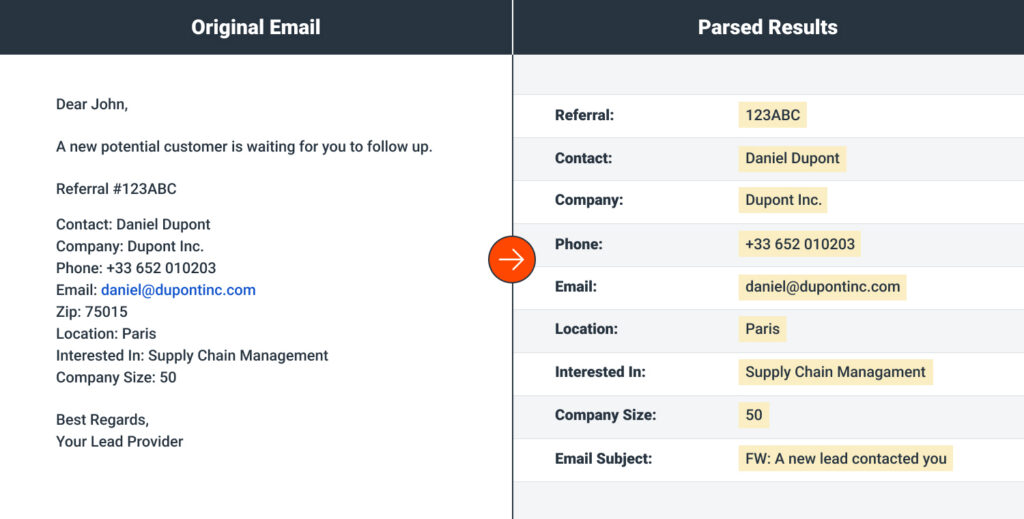
How Email Parsing Works - Before & After

Respond faster and close more deals

With data landing on your CRM in the form of new leads, the sales team is free to respond much quicker than before, while leads are still warm. This boost in speed to lead can go a long way to outpace your competition and move prospects closer to conversion.

In fact, not using CRM automation puts you at a disadvantage because your competitors are using it to improve their speed to lead.

But does this mean you have to switch to another CRM to automate lead data entry? No. You can use Mailparser to move lead info from your inbox into your CRM in minutes.


Capture Leads from Emails to CRM Effortlessly

Save countless hours of tedious data entry and streamline your workflows.

No credit card required.

How Mailparser Automates CRM Data Entry

Mailparser automates CRM data entry by extracting lead information from incoming emails and their attachments, then transferring the extracted data to your CRM through an integration. Instead of manually copying information from email notifications, sales representatives can have new lead records created automatically.

Mailparser is an email parsing tool that businesses use to extract information from emails (including attachments) and send it to their business systems. This helps them replace manual data entry with automated data extraction.

How does it work? Watch this short video to see Mailparser in action:

As shown here, the setup process is actually quite simple. Once your email parser is ready, your automated workflow will look like this:

  1. You forward emails that contain lead details to your Mailparser inbox.
  2. Mailparser extracts lead data using a customizable set of parsing rules.
  3. It then automatically exports parsed data to your CRM via an integration that connects the two platforms.
  4. As new data lands on your CRM, it creates new lead records, and you can move on to the next steps in lead management: lead routing, follow-ups, etc.

Why use Mailparser to automate lead data entry?

Leads often come via email, with the details being either in the body or an attached file. Automating lead data entry is one of our most common use cases. Users in various industries, from real estate to financial planning and marketing services, rely on Mailparser to extract leads from inboxes to CRMs.

Businesses often face challenges in lead management, such as moving data from emails generated by legacy systems into modern platforms like Salesforce and HubSpot. Another challenge is having developers spend time building custom email parsing tools instead of focusing on higher-priority projects. And there is also the issue of needing to centralize information from multiple sources into one CRM.

Those were challenges that our customers faced before they started using Mailparser. They were able to streamline lead capture, save valuable time, and automate the next actions in their lead management workflows.

Take, for instance, this video on how Mailparser automates lead import for a mortgage lending business:

FAQ About CRM Data Entry Automation

What is CRM data entry automation?

CRM data entry automation is the process of automatically collecting, extracting, and transferring lead or customer data a CRM. It drastically reduces manual work, minimizes human error, and helps CRM users perform their tasks faster.

How can I automate data entry into my CRM?

You can automate CRM data entry by using an automation tool that captures that data for you and sends it to your CRM via an integration. These tools extract information from incoming emails and attachments, structure it, and send it directly to your CRM to create or update records.

How do I automatically transfer information from emails to a CRM?

Use an email parsing tool to extract information from inbound emails and attached files. It can easily capture common fields such as names, email addresses, phone numbers, company details, and text fields. Extracted data is then transferred to your CRM either directly or through an integration.

Can I use AI to automate data entry?

Yes, but in order to automate data entry end-to-end, you need more than just AI: you need to design a workflow that incorporates AI to capture information from its source and move it where you need it to be. While a general-purpose AI tool (like ChatGPT) can extract data from a file for an occasional need, it may not be the best choice for routine workflows because you might face issues with prompt design and token cost.

For accurate data extraction and workflow automation, you should use a tool built for that purpose. Depending on your use case, you may or may not need AI parsing capabilities.

Can I automate CRM data entry without replacing my existing CRM?

Absolutely. You don’t have to disrupt your sales team’s workflows and invest in a potentially more expensive CRM just to automate lead data entry. A tool like Mailparser fits neatly into your sales system and will move data into your CRM without disrupting day-to-day operations.

How does automated data entry improve speed to lead?

Automated data entry reduces the time between capturing a lead and making it available to your sales team. By automatically extracting contact details and sending them to your CRM, you can speed up lead assignment and follow-ups, helping your team engage prospects before they lose interest.

Respond to Leads Faster Today

Manual CRM data entry slows down your sales process, delays follow-ups, and leaves room for data errors. Automating it helps your team capture leads faster, maintain accurate records, and spend more time selling. As a result, your business improves speed to lead and closes more deals.

Mailparser helps you at the lead capture stage by moving data from your inbox to your CRM. No need to switch platforms or build a custom tool from scratch. Just set up your parser and connect it to a platform like Salesforce. Sales reps will save hours of manual work every week and accelerate your sales process. Sign up for a free trial and turn emails into clean CRM records.

Send Leads from Emails to Your CRM Effortlessly

Save countless hours of tedious data entry and streamline your workflows.

No credit card required.

You Might Also Like

Automatically Extract Data From Emails

Capture data from incoming emails and send it to spreadsheets, Google Sheets, databases, APIs, integration services, and more.

No credit card required