What Is Lead Routing?
Lead routing is the process of automatically assigning new leads to sales reps based on pre-set criteria:
- Company size
- Geographic location
- Industry or niche
- Deal value
- Lead score
- Sales rep expertise
- Company hierarchy (parent or subsidiary)
- Availability of sales reps
- Round robin assignment (distributing leads evenly among sales reps in rotation)
- Language
Manual lead assignment can work well for small teams, but it might be inefficient when dealing with high lead volumes or a large team, potentially leading to confusion, delays, or assigning a lead to the wrong person.
When set up properly, lead routing ensures every lead reaches the right sales rep as quickly as possible — once the lead data enters the CRM.
To make your lead routing as effective as possible, be sure to follow these four best practices:
Define clear and consistent rules
First, define clear criteria that route leads consistently and without ambiguity. For example, leads with a score above 80 and over 500 employees are assigned to senior account executives, while others go to general reps.
Use multi-criteria (tiered) routing logic
Relying on one criterion only isn’t enough for optimal assignments. Don’t hesitate to combine multiple criteria to build a tiered system. For example, a lead is first routed based on location, then filtered by company size (enterprise vs SMB), matched to reps with the right expertise, and finally assigned based on availability and round robin distribution among qualified reps.
Balance speed and accuracy
While speed is important, accuracy matters too. Assigning the most suitable representative to a given lead should be the top priority, even if the response speed isn’t always the fastest.
The quality of their conversation with the lead plays a big role in winning them, whereas a top-speed response from the wrong rep can cost the deal. That’s why routing accuracy is just as important as speed.
Match leads to the right sales expertise
You should match leads based on expertise such as industry specialization, product knowledge, deal size experience, language, etc. When leads are assigned to reps who understand their specific context, conversations become more relevant, and deals move forward more efficiently.
But here’s the catch: to benefit from lead routing, you need to get lead data into your CRM. The problem is that CRM data entry slows down response times.
Why CRM Data Entry Costs Sales Teams Deals
Manual CRM data entry is time-consuming, error-prone, slows down follow-ups, and costs the sales team opportunities.
CRM data entry costs precious time
On average, sales reps spend 17% of their time doing CRM data entry. That’s close to an entire workday in a 40-hour workweek. The time they spend adding new leads to their CRM should be spent responding to leads and connecting with them.
Data entry errors might lead to routing a lead to the wrong person
Mistakes in fields like company size, location, or industry can cause a lead to be assigned to the wrong sales rep. This results in irrelevant conversations, late follow-ups, and lost opportunities that could have been won with more accurate data.
Slow follow-ups lead to lost opportunities
While your team is busy adding details manually, other businesses are already responding to the same leads and starting conversations with them.
In other words, manual CRM data entry helps your competitors win your leads.
So what’s the solution?
The solution to eliminate this bottleneck is automating the inbox-to-CRM workflow. Why? Most of the time, lead notifications come to you by email. Whether a lead fills out a contact form, writes an email, signs up for a webinar, reaches out on social media… You will most likely receive an email notification with the data you need to enter into your CRM.
Picture this: your team doesn’t enter data manually anymore; it extracts it to a CRM like Salesforce or Zoho CRM, saving hours of work every week.
How Does Inbox-to-CRM Automation Improve Lead Routing?
By moving lead data from incoming emails to a CRM, you remove the hurdle of CRM data entry from lead management.
So when people in the sales team receive email notifications for new leads, they can add them to the CRM in a matter of minutes, no matter how many leads there are.
As soon as the lead data comes in, lead routing kicks in and assigns every lead to the appropriate sales res based on pre-defined rules. As a result, sales reps can follow up with leads much faster than before, while interest is still high.
To streamline your lead routing, though, you need a tool to extract lead data from emails.
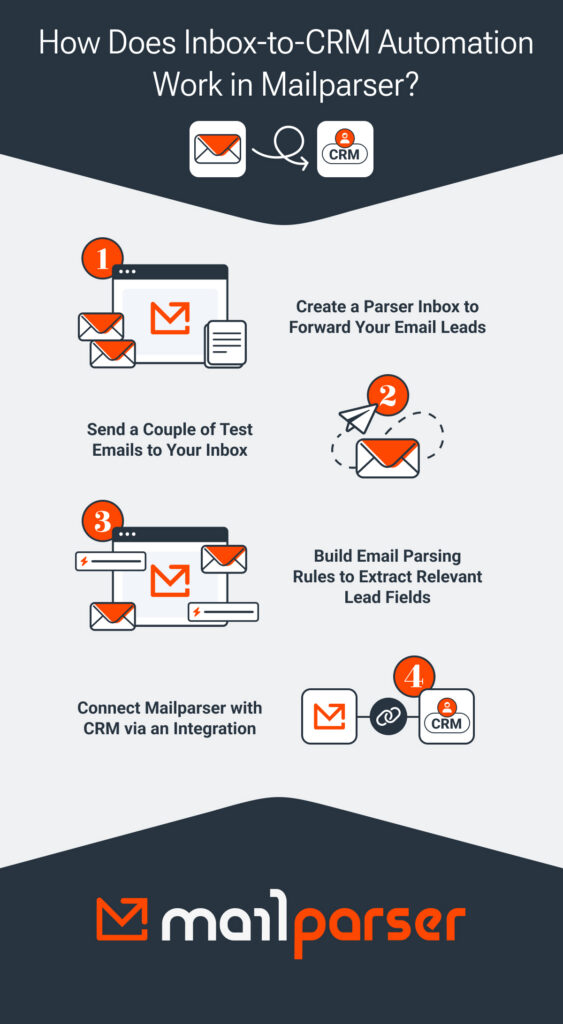
With Mailparser, our email parser, your automated lead routing workflow will look like this:
- You receive email notifications for new leads.
- You forward those emails to Mailparser.
- Mailparser extracts the lead data according to set parsing rules.
- Mailparser then exports the lead data to your CRM, and it creates new leads. We have native integrations with Salesforce, SuiteCRM, and Zoho CRM, but you can also send data to any other CRM via a webhook or Zapier.
- Your CRM applies the lead routing rules and automatically assigns leads to sales reps.
This workflow eliminates CRM data entry and provides your CRM with timely and accurate data for lead routing.
Mailparser acts as the bridge between your inbox and your CRM, ensuring that lead data moves from the former to the latter swiftly and without inaccuracies.
Benefits of Automating Data Entry and Lead Routing
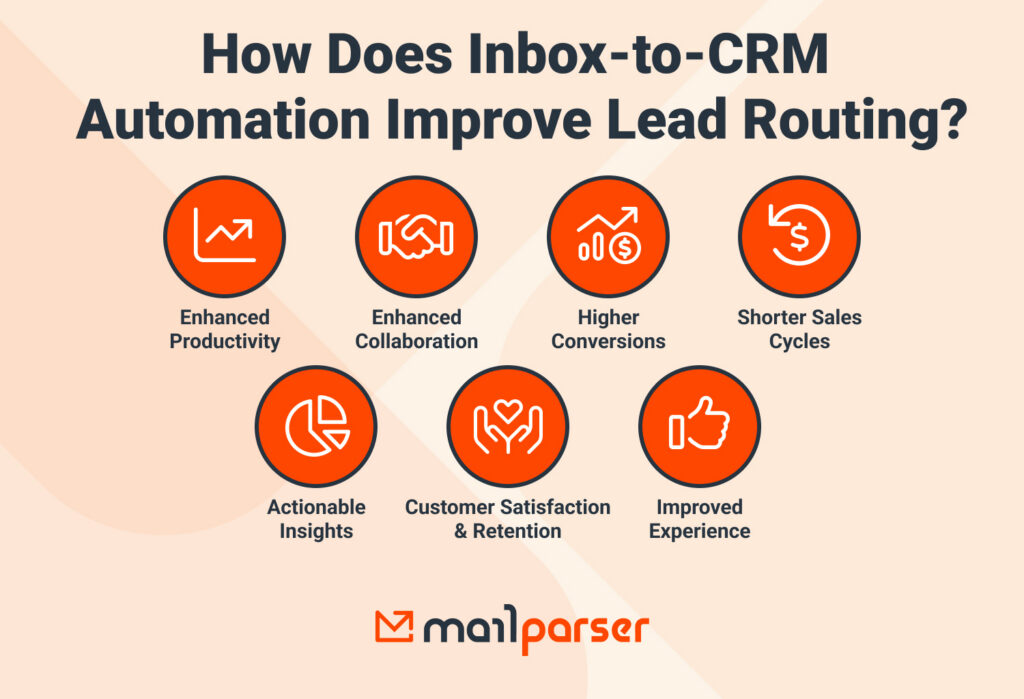
Automating CRM data entry and lead routing helps sales teams route cleaner lead data, respond faster, improve CRM lead tracking, and convert more leads into customers.
1. Route clean lead data to your sales reps
Manual data entry always carries the risk of inputting incorrect information. It’s hard for sales reps to make sure all data is accurate, especially when handling large volumes of leads.
Using an email parser solves this problem by identifying and extracting the relevant data fields (name, email, phone, job title, company name, etc.). Once set up, it converts incoming emails into structured, accurate lead data that sales reps can immediately work with.

2. Follow up faster
Speed-to-lead is crucial for client acquisition. The faster a sales rep responds to a new lead, the higher the chances of converting them into a customer. Data entry automation helps lead routing run faster, allowing reps to connect with leads promptly. This can make all the difference between winning and losing deals.
 Photo by Vitaly Gariev from Pexels
3. Improve CRM lead tracking with timely and accurate data
When lead data is automatically captured and sent to the CRM, records stay consistently up to date. This improves visibility across the pipeline, making CRM lead tracking easier for teams to track lead status, activity, and progression without gaps or outdated information.
4. Convert more leads into clients
Faster follow-ups, better data quality, and more accurate lead assignments all work together to improve conversion rates. When every lead reaches the right rep at the right time, the performance of the sales team will increase significantly.
Build Your Automated Email-to-CRM Lead Routing Workflow
Automating your email-to-CRM workflow removes one of the biggest bottlenecks in sales operations: manual data entry. Instead of wasting time manually creating leads, your team automates the process in minutes. That way, your CRM routes leads to sales reps, and they follow up with them faster than the competition.
The key to building this automated workflow is extracting lead data from emails and sending it to your CRM. And that’s precisely what Mailparser is built to do. Sign up today for a free trial and start converting emails to accurate data. Whenever your CRM is updated with new leads, your lead routing workflow kicks in, assigning every lead to the right sales rep based on preset criteria. This is how your business accelerates speed-to-lead, improves CRM lead tracking, and converts leads to customers.