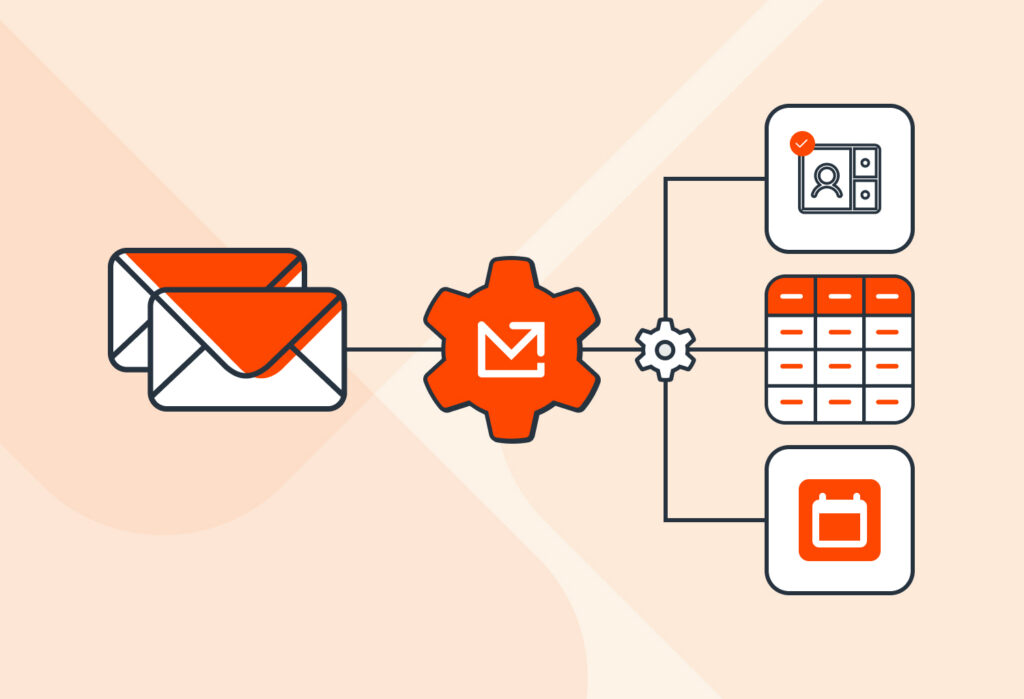
How Sales Automation Works and Why You Need It in 2026

Last Updated: July 3, 2026
Sales Automation

Table of Contents

Automatically Extract Data From Emails

Capture data from incoming emails and send it to spreadsheets, Google Sheets, databases, APIs, integration services, and more.

No credit card required

Sales teams lose much of their time to manual tasks that detract from the real work: talking to leads and moving them through the sales cycle. Because they get stuck copying lead details between tools, updating records, or chasing down information, they respond to leads too late and lose them to the competition. Sales automation helps overcome this challenge by handling repetitive tasks.

By automating processes like lead management, meeting scheduling, and email nurturing, to name a few, sales reps can respond faster and spend more time closing deals.

In this guide, we walk you through how sales automation works, its benefits, workflows you can (and should) automate, challenges to avoid, and some FAQs.

Capture Data from Emails Effortlessly

Save countless hours of tedious data entry and streamline your workflows.

No credit card required.

What Is Sales Automation?

Sales automation is the use of software tools to automate sales-related processes that, historically, are performed manually. Automating those processes helps increase productivity, improve the customer experience, meet sales goals, track performance, and more. Examples of time-consuming processes you can automate include:

  • Data entry
  • Lead routing and assignment
  • Scheduling meetings or demos
  • Follow-up emails
  • Reminders
  • Reporting
  • Customer retention
  • And more

In addition to automating workflows, the evolution of AI technologies has opened more automation possibilities. For instance, businesses can use predictive analysis to identify high-value leads with greater accuracy and speed up sales forecasting. Also, generative AI can help with delivering more personalized customer interactions, providing support 24/7, optimizing follow-up times and frequency, and more.

How Sales Automation Works

Essentially, sales automation works by capturing data following an event and automatically performing an action based on pre-defined rules.

Let’s take the most common example: capturing data following the initial lead interaction.

  1. An event triggers the workflow. Here, a prospect submits a contact form, sends an email, requests a demo, or downloads a resource.
  2. Data is collected. The automation captures the relevant data: contact details, company information, lead source, interest in a specific product or service, etc. This data is either directly logged in the CRM or sent to it after being captured by a separate tool.
  3. Rules determine what happens next. The sales automation software applies predefined rules, such as assigning the lead to a sales rep based on criteria like location, availability, expertise, etc.
  4. The next actions are performed automatically. The automation carries out the next actions, e.g., creating a record in the CRM, notifying the sales rep, and scheduling a follow-up task.

But that’s not the only workflow you can automate — far from it. Automation can apply the same principle at every stage of the sales cycle:

  • Pipeline management: updating deal stages, sending reminders, notifying stakeholders when milestones are reached, etc.
  • Sales analytics and reporting: collecting sales data to analyze performance and uncover actionable insights related to customer behavior, churn, optimizing processes, and so on.
  • Deal risk assessment.
  • Creating content with generative AI: drafting follow-up emails, proposals, meeting summaries, etc.
  • Revenue forecasting.
  • And more.

Those workflows follow the same core structure: an event triggers the workflow, data is collected, predefined rules determine the next step, and actions are carried out.

Automation relies on interconnected tools, with your CRM at the heart of it

To automate sales processes, businesses use a combination of data and technology working in sync.

Your CRM (Customer Relationship Management) platform is at the core of your sales automation system. It’s the hub where all lead and customer data is logged: contact details, conversations, status, etc.

Most CRMs include built-in automation and support integrations, plugins, and add-ons that extend their functionality. By connecting the CRM with other sales and business tools, companies can synchronize data and automate workflows across multiple platforms.

Capture Data from Emails Effortlessly

Save countless hours of tedious data entry and streamline your workflows.

No credit card required.

What Are the Benefits of Sales Automation?

Sales automation has many benefits, namely increasing productivity, faster speed-to-lead, closing more deals, easier lead management, and identifying opportunities for customer acquisition and retention.

Employees become more productive

Sales automation tools allow your team to save the time they usually spend on repetitive, low-value tasks. With that tedious work out of the way, their productivity will increase a lot. Concretely, this means:

  • Sales reps spend more time selling.
  • Each rep handles more prospects.
  • Overall sales team performance improves.

Moreover, by capturing lead data instead of inputting it manually, your team will avoid data entry mistakes that create problems, which take extra time and work to fix.

Close more deals with faster speed-to-lead

Speed-to-lead plays a crucial role in closing deals. A quick response puts you ahead of competitors and earns the trust of leads. Consider the following statistics:

  • 78% of customers buy from the first responder.
  • Responding within 5 minutes makes you 21 times more likely to qualify a lead than responding after 30 minutes (according to Harvard Business Review).

The key to improving your speed-to-lead is — you guessed it — using sales automation tools.

Meeting with Prospect

Manage more leads without hurdles

Sales automation helps teams handle a growing volume of leads without getting overwhelmed. Instead of manually tracking every inquiry, leads are automatically captured, organized, and assigned to the right salesperson. This ensures that no opportunity slips through the cracks, even as demand increases.

Identify new opportunities

Sales automation improves pipeline visibility, helping teams spot high-intent leads, understand performance trends, and detect churn risks early. With structured data and analytics, teams can prioritize better opportunities, optimize lead sources, and take proactive action to retain customers and grow revenue.

3 Sales Workflows You Can Automate

Three of the top sales workflows we recommend you automate include lead capture and management, meeting and demo scheduling, and follow-up emails. They cover different stages of the sales funnel and complement each other to improve productivity and performance.

1. Lead capture and management

Lead capture and management is often the first workflow businesses automate because it has a direct impact on speed-to-lead. It can look like this:

  1. A lead contacts your business via a form, email, demo request, etc.
  2. An automation tool captures the lead data and adds it to the CRM.
  3. The lead is assigned to a sales rep.
  4. The rep receives a notification to follow up.

Mailparser can automate lead capture by extracting data from incoming emails (including attachments) and sending it to your CRM. This eliminates manual data entry and helps ensure every lead is captured and processed quickly.
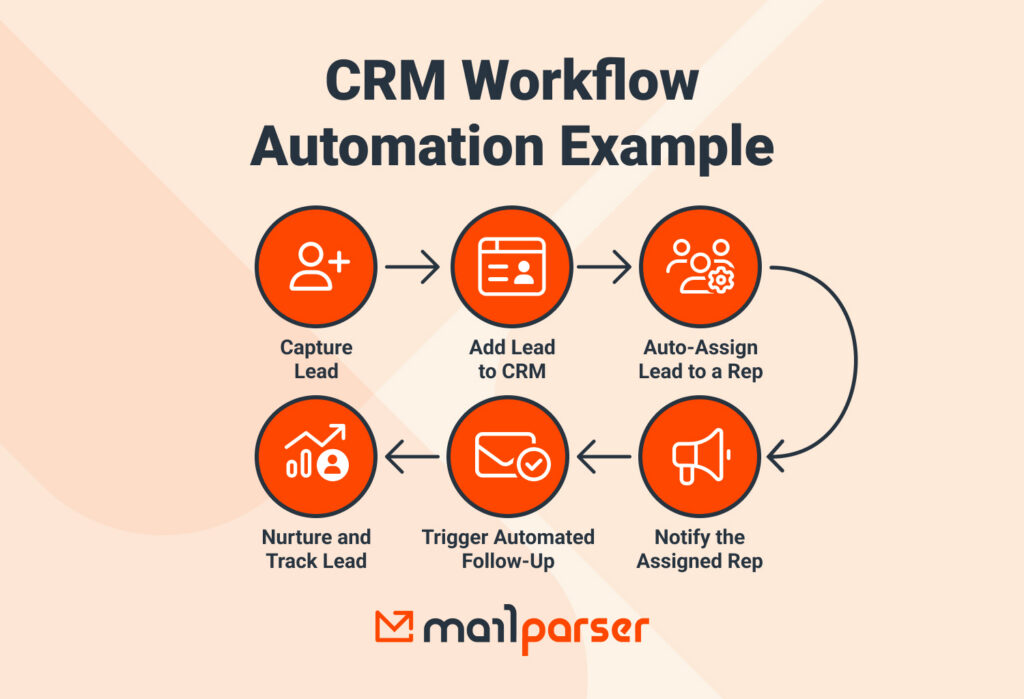
Automated CRM Workflow Example

2. Scheduling meetings and demo calls

Traditionally, scheduling meetings involves multiple, cumbersome rounds of emails or phone calls.

Instead of going through that back-and-forth, the lead receives a single email with a link. They click on it and choose a date and time that suits them from the rep’s availability.

The meeting is then automatically added to both calendars, while confirmation emails and reminders are sent without any manual intervention. This creates a smoother experience for both prospects and sales representatives while reducing administrative work.

3. Follow-up emails and lead nurturing

Consistent follow-up is essential to moving leads through the sales pipeline, but manually tracking every prospect can quickly become overwhelming.

Sales automation allows businesses to trigger follow-up emails based on specific actions or milestones. For example, a prospect may receive a follow-up email after a demo, a reminder after viewing a proposal, or a nurturing sequence if they stop engaging.

By automating these communications, businesses can ensure every lead receives timely and relevant follow-ups without requiring sales representatives to manage each interaction manually.

3 Challenges of Automating Sales and How to Avoid Them

To reap the benefits of sales automation, you need to implement it thoughtfully. Common challenges that teams face during implementation include setting clear goals, personalization, and connecting tools.

1. Setting clear goals

One of the biggest mistakes businesses make is automating workflows without defining what success looks like. As a result, they struggle to measure the impact of their automation efforts.

Before implementing any automation, identify the specific outcome you want to achieve. For example, your goal might be to improve speed-to-lead by 50%, reduce manual data entry, or increase the number of qualified leads handled per salesperson.

How to avoid this: Define clear objectives and track them using relevant KPIs. This will help you measure performance and identify opportunities for improvement.

2. Personalization

Without a personalized experience, many leads simply don’t convert. Today’s buyers expect relevant communications that reflect their interests, behavior, and stage in the buying journey.

While automation can save time, relying on generic messages can make interactions feel impersonal and reduce engagement.

How to avoid this: Use customer data to personalize automated emails, follow-ups, and outreach. Segment your audience and tailor communications based on factors such as lead source, product interest, engagement level, or sales stage.

3. Connecting tools

When the tools your team uses are fragmented, employees end up doing manual work like copying and pasting information, notifying team members with written messages, compiling data into reports, chasing missing data…

Not only does this waste valuable time, but it also increases the risk of errors, duplicate records, inconsistent data, and missed follow-ups. Over time, these inefficiencies can slow down the sales cycle and undermine the benefits of automation.

How to avoid this: Prioritize tools that integrate with your existing technology stack and map out how data should flow between systems before implementing automation. The fewer manual handoffs required, the more effective your automation strategy will be.

Sales Automation FAQ

What tasks can be automated in sales?

You can automate CRM data entry, lead routing, lead assignment, meeting scheduling, follow-up emails, setting reminders, report generation, analytics, forecasting, and more.

What is an example of sales automation?

A typical example of sales automation is automatically scoring incoming leads based on their activity and profile, then routing the highest-quality leads to the appropriate sales representative for immediate follow-up.

What tools are used for sales automation?

Common examples include CRM platforms, scheduling software, email automation tools, analytics solutions, and workflow automation platforms. Tools like Mailparser can also automate data extraction from emails and documents, helping eliminate manual data entry and streamline lead management.

What is the difference between sales automation and marketing automation?

The two operate at somewhat different levels of the customer journey. Sales automation focuses on managing and converting leads who have already expressed interest, while marketing automation focuses more on attracting and nurturing prospects who have yet to become qualified leads.

Also, sales automation focuses on automating daily sales-related tasks, whereas marketing automation automates campaigns across multiple channels.

How do I get started with sales automation?

You can start by identifying repetitive, time-consuming processes in the sales department. A common culprit is lead capture and management. If it’s currently inefficient, you can streamline it with email parsing. By automating the process of capturing lead details from incoming emails and adding them to your CRM, you’ll be able to automate subsequent processes like lead routing, follow-ups, and more.

In Conclusion

Sales automation solves the long-standing challenges of manual tasks that slow down response times and hurt sales performance. By investing in the right sales automation tools and building automated workflows that handle repetitive work, sales reps can focus on connecting with leads and closing deals.

This isn’t merely a matter of keeping up with technology trends. Your business needs to implement sales automation if it hasn’t already, because the competition is already using it. Clients go to the fastest-responding businesses, and your company can be one of them by streamlining processes.

If your sales team loses time entering lead details into a CRM, give Mailparser a try. By extracting lead data from emails into your CRM (or any cloud app) and automatically creating new records, your sales team can follow up much faster and start conversations that turn into new business.

Capture Data from Emails Effortlessly

Save countless hours of tedious data entry and streamline your workflows.

No credit card required.

You Might Also Like

Automatically Extract Data From Emails

Capture data from incoming emails and send it to spreadsheets, Google Sheets, databases, APIs, integration services, and more.

No credit card required