What Is AP Invoice Processing?
AP (Accounts Payable) invoice processing is the process that every invoice undergoes from receipt to payment and documentation. A typical AP workflow includes receiving invoices, capturing key details, validating them against purchase orders, routing them for approval, and scheduling payment. Lastly, the Accounts Payable department records the invoice in the general ledger.
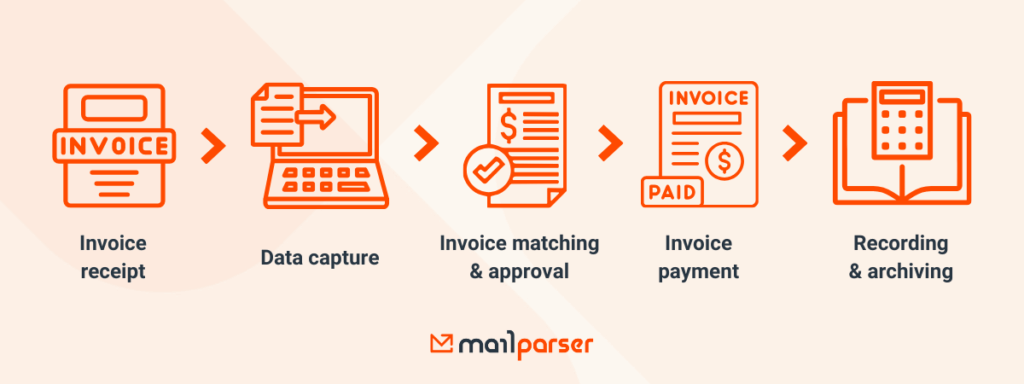
Along the way, accuracy and timing are essential: a missing field, a duplicate invoice, or a delayed approval can slow down the entire cycle. When dozens or even hundreds of invoices arrive each month, you need to keep your invoice management system running smoothly.
At its core, AP invoice processing is about keeping payments accurate, on time, and fully traceable. Since manual data entry infamously takes a lot of time and is error-prone, switching to automated data capture is much more efficient and reliable.
This is where an email parser like Mailparser comes in. Within just a few minutes, you can set up our no-code tool to extract invoice data from incoming emails and send it to your accounting software. Here is how to get started.
To summarize, follow these steps:
- Create an inbox in Mailparser.
- Forward an email with an attached invoice to your Mailparser address.
- The Automatic Wizard Setup identifies the invoice data fields and creates a set of parsing rules. You can edit your rules as needed to fine-tune the parsing results.
- Add an integration to export your invoice data to your ERP, accounting software, or anywhere else.
Once your custom invoice parser is up and running, you will automate the process of extracting data from invoices and moving it to your invoice management system.
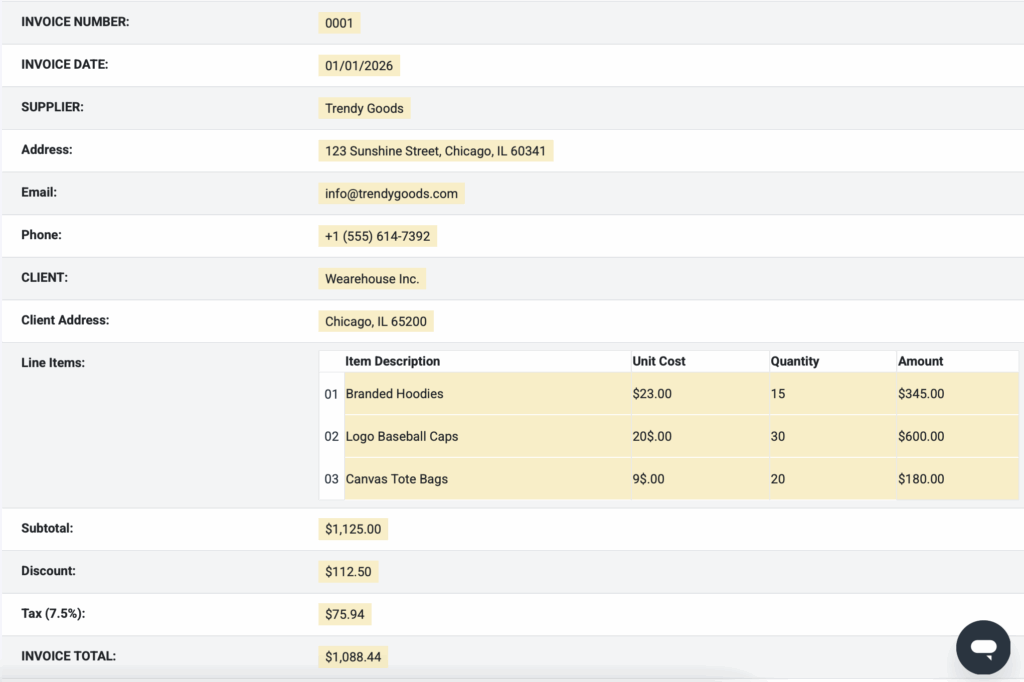
You will save hours of tedious work, prevent data entry errors, and build a fully automated invoice workflow.
Where Legacy AP Systems Fall Short
Legacy AP systems can hardly keep up with the pace and complexity of today’s invoice volumes. When every invoice requires human input, these issues arise:
- Too much time is lost to manual data entry.
- Human error. It’s not uncommon for AP employees to enter incorrect amounts, assign an invoice to the wrong category, forget a data field, record an invoice twice, etc. Human attention has limits, after all. These errors create reconciliation issues later.
- Payments get delayed, which frustrates suppliers.
- Missing out on early payment discounts.
- Invoice management inefficiencies: invoices get stuck in inboxes, approvals pile up, bottlenecks occur, and more.
- The risk of fraud increases, whether internally or from outside fraudsters.
- Lack of visibility on the status of invoices.
- Employees have less time to analyze spending and optimize cash flow.
And because legacy tools don’t integrate well with modern accounting or ERP platforms, teams spend hours chasing information or reconciling discrepancies. That time is better spent on higher-value work.
What Modern AP Invoice Processing Should Look Like
Businesses everywhere have transitioned into automated invoice processing to overcome the limitations of legacy systems, with many more moving in the same direction.
Now and moving forward, top-performing AP teams use a combination of the following practices:
- Less manual overhead.
- Invoice data extraction replaces data entry, seamlessly moving data from invoice files to ERPs and accounting software.
- AI adoption: AI OCR, smart three-way matching, exception handling, cash flow forecasts, and more.
- Automation of workflows: three-way validation, invoice routing, bank reconciliation, approval notifications, etc.
- Scheduled digital payments.
- Real-time visibility, analytics (with clear KPIs), and cash-flow control (increasingly important amid ongoing inflation).
- Compliance with global e-invoicing standards, like the VAT in the Digital Age (ViDA) in Europe.
These characteristics are redefining what AP invoice processing means and will soon become the norm, no matter the industry or company size.
Lower costs, shorter cycle times
According to the State of ePayables 2025, a report made by Ardent Partners, the best-in-class AP teams are able to reduce the all-inclusive cost of processing a single invoice down to $2.65, whereas other AP teams have an average cost of $12.42. Also, it only takes 2.9 days for the best-in-class teams to process invoices, which is an outstanding performance compared to the average time of 13.5 days.
Undoubtedly, they are on top of the latest evolutions in AP workflows – as shown above. Modernizing AP invoice processing is no longer a nice-to-have but a necessity for smooth and cost-effective procurement operations.

How Email Parsing Streamlines Modern AP Workflows
Email parsing can be the missing piece in the automation puzzle. Mailparser fits easily within your AP system. While modern accounting platforms offer accounting and bill‑pay automation, they don’t always capture invoice data the moment an email arrives in your AP workflow. That’s where email parsing fits easily within your AP system and transforms your process from manual to near‑touchless.
Benefits of email parsing
Email parsing allows you to:
- Replace manual data entry with invoice data extraction.
- Prevent human error. No more mistyped amounts, omitted fields, or description typos.
- Reduce the overall cost of invoice management by eliminating repetitive tasks.
- Speed up invoice intake so your team focuses on approvals and exceptions.
File name: ap-invoice-processing-with-mailparser
Use case: Mailparser + QuickBooks automated workflow
Let’s say you use QuickBooks. Here is an example of an automated workflow you can build with Mailparser acting as the bridge between invoices received by email and QuickBooks.
- You receive invoices from your suppliers via email.
- You forward those emails to your Mailparser address.
- Mailparser extracts invoice data from the email attachments.
- Mailparser sends the data to QuickBooks via a Zapier integration. Bills are automatically created on QuickBooks, each containing data from one of the invoices.
- One of the workflows on QuickBooks Online Advanced triggers automated actions like routing bills for approval, setting reminders for due dates, and scheduling digital payments once conditions are met.
- A Bill Multi-Condition Approval workflow triggers based on pre-set conditions (like vendor, amount, etc.), sending an email notification to a Bill approver as well as assigning an approval task to them.
By combining email parsing with accounting or ERP platforms, Accounts Payable departments eliminate manual steps, reduce errors, and ensure invoice data flows directly into financial systems where it can be acted on quickly and accurately.
Start Parsing Your Invoices Today
Email parsing is the missing link in automated invoice processing. By automatically moving invoice data from email attachments into your accounting system, you save countless hours of work, avoid errors and late fees, gain better visibility into spending, and strengthen vendor relationships. Hours of manual processing are reduced to minutes, bottlenecks disappear, and the AP department can focus on higher-value tasks.
Unlock end-to-end AP invoice management, and your team will thank you for the time saved, the accuracy gained, and the smoother workflows. Get started today by parsing invoices using Mailparser and sending data to your system.