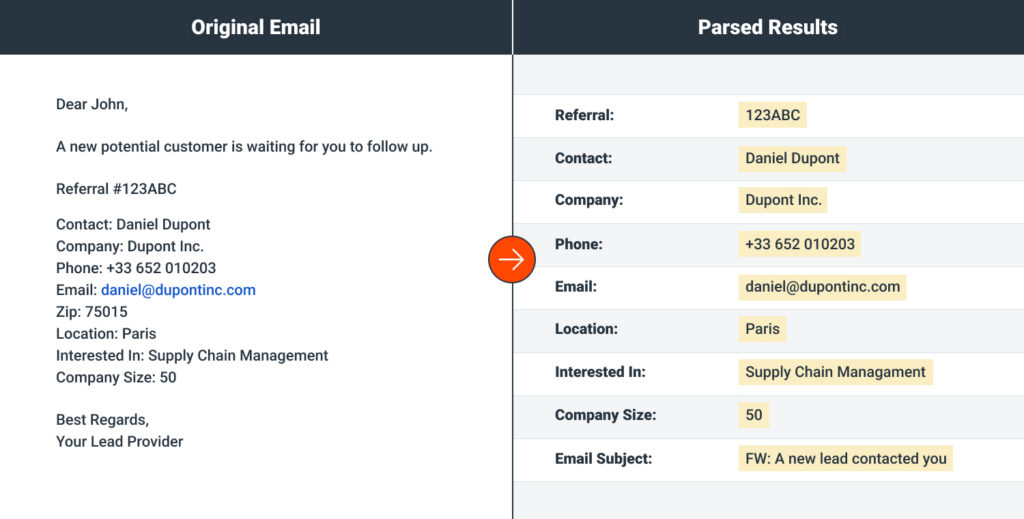
In essence, an email parser transforms unstructured information stuck in your inbox into structured, ready-for-use data. This makes it so much easier to organize, analyze, and act on the information your business receives every day.
What Are Typical Use Cases for an Email Parser?
An email parser can be used to pull data fields from any kind of machine-generated email, such as:
- Invoices and purchase orders: Automatically extract key details like invoice numbers, dates, item lists, and totals, and send them into spreadsheets or accounting tools.
- Emails sent by lead providers: Capture lead data such as names, emails, and company details, and automatically send it into your CRM.
- Contact form emails: Automatically extract the contact information and inquiries of website visitors who filled out a contact form. Their data is added to your CRM.
- Shipping notifications and tracking updates: Extract shipping confirmations, tracking numbers, shipment statuses, and delivery details to keep systems updated in real time.
- Customer support tickets: Capture customer issues, priorities, and contact details from emails and send them directly into your help desk system.
This makes it an efficient and reliable solution for various use cases. Popular use cases for email parsing are:
- Automating order fulfillment in e-commerce.
- Automating the lead management process.
- Centralizing data that is sent by email from different web forms.
Once an email gets parsed, the data is available in an easy-to-handle format such as CSV, JSON, or XML. The data can then be downloaded or used to automatically update other apps.
For specific examples of how email parsing can be used to automate business processes, please have a look at this list of Mailparser case studies.
Is Email Parsing Like Web Scraping?
Email parsing is similar to web scraping in the sense that it extracts data from a source, eliminating the need to enter data manually. However, there is one key difference to keep in mind.
Web scraping tools extract data from HTML websites, whereas an email parser extracts data from the emails you receive in your inbox. Specifically, email parsing lets you extract the email header content, body content, attachments, and even the signature of incoming emails. The data you want from emails is piped to the location where you need it to be based on your parsing rules. It’s as simple as that.
What Are the Benefits of Using An Email Parser?
Email parsing software offers several benefits for businesses that deal with large volumes of email data, namely: faster data processing, lower data entry costs, higher data accuracy, and workflow automation.
Faster data processing
Email parsers significantly speed up how quickly data is processed. Instead of manually reading emails and copying and pasting data, the software takes care of this automatically.
Whether you need to input data from one email or a hundred, email parsing can handle that task in a matter of minutes. By contrast, manual data entry can take hours each week per employee, adding up to a high annual cost.
“It would be impossible to organize the data I need without using Mailparser to extract it from emails. It would take hours and hours daily.”
— Mailparser user
By automating repetitive tasks, teams can focus on higher-value work such as connecting with leads, serving customers, conducting strategic reviews, etc. This results in faster workflows, fewer inefficiencies, and ultimately better business outcomes.

Lower processing costs
Data entry dulls every business’s competitive edge, as it is time-consuming and error-prone. It also creates a new hurdle when the business wants to scale: more emails to process mean higher processing costs.
By using email parsing software, businesses reduce that cost significantly. Automation handles this sort of basic but repetitive work at scale, allowing operations to run smoothly without having to increase headcount.
Over time, this leads to massive cost savings, especially for teams that process hundreds or even thousands of emails daily.
Higher data accuracy
Manual data entry introduces the risk of human error. Typos, missed fields, or incorrect data can all lead to costly mistakes. With email parsing, data is extracted consistently based on predefined rules, ensuring accuracy every time.
“The use of Mailparser eliminated all the errors we had when the processes of reading emails and registering information were made manually.”
— Mailparser user
This level of consistency helps businesses maintain reliable records and make better decisions based on accurate data.
Workflow automation
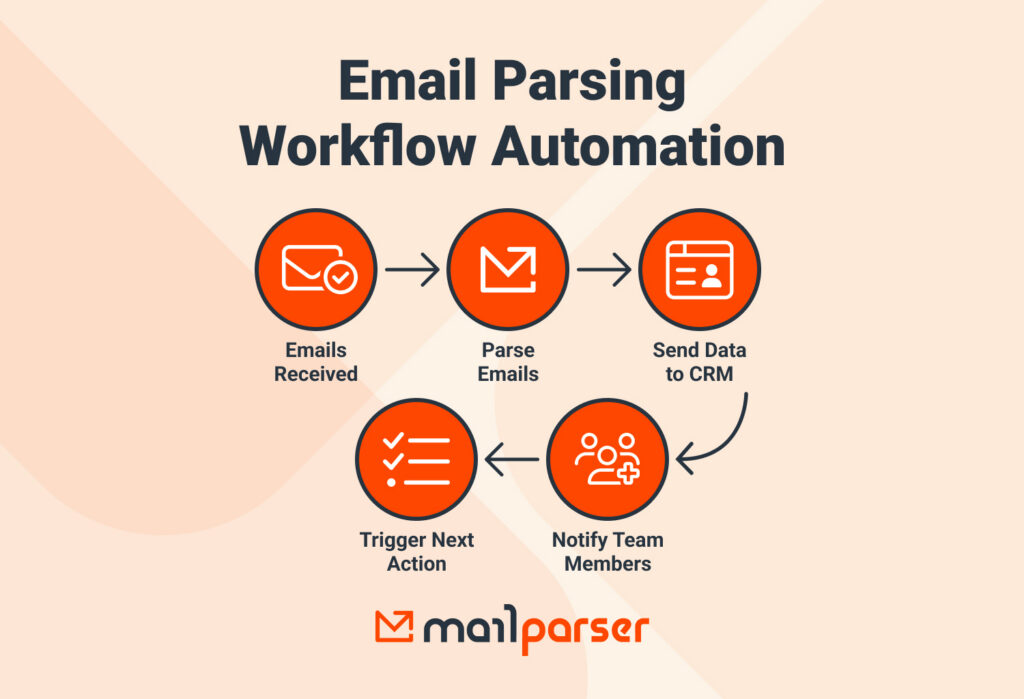
Email parsing can play a key role in workflow automation. Once data is extracted, it can automatically trigger actions in other tools. For example, parsed data can:
- Create new CRM contacts.
- Update spreadsheets in real time.
- Trigger notifications or alerts in a collaboration platform like Slack.
- Start automated workflows in other apps.
This allows businesses to build end-to-end automated systems that reduce manual effort and improve operational efficiency.
Try Mailparser
If you want to automate data entry with the best email parser, look no further than Mailparser. Our email parser is designed to help you extract data from emails into your systems without technical skills or inaccuracies.
With a rating of 4.9/5 on GetApp, Mailparser helps businesses save time, lower costs, and work faster. As of March 2026, our tool has parsed over 134 million emails and counting. Feel free to explore our email parsing features, integrations, case studies, or pricing. Can’t find what you are looking for or have a question? Don’t hesitate to contact us.
Want to give it a try? Sign up for free and send your first email to see how simple and efficient email parsing is.