What Is Accounts Payable Automation?
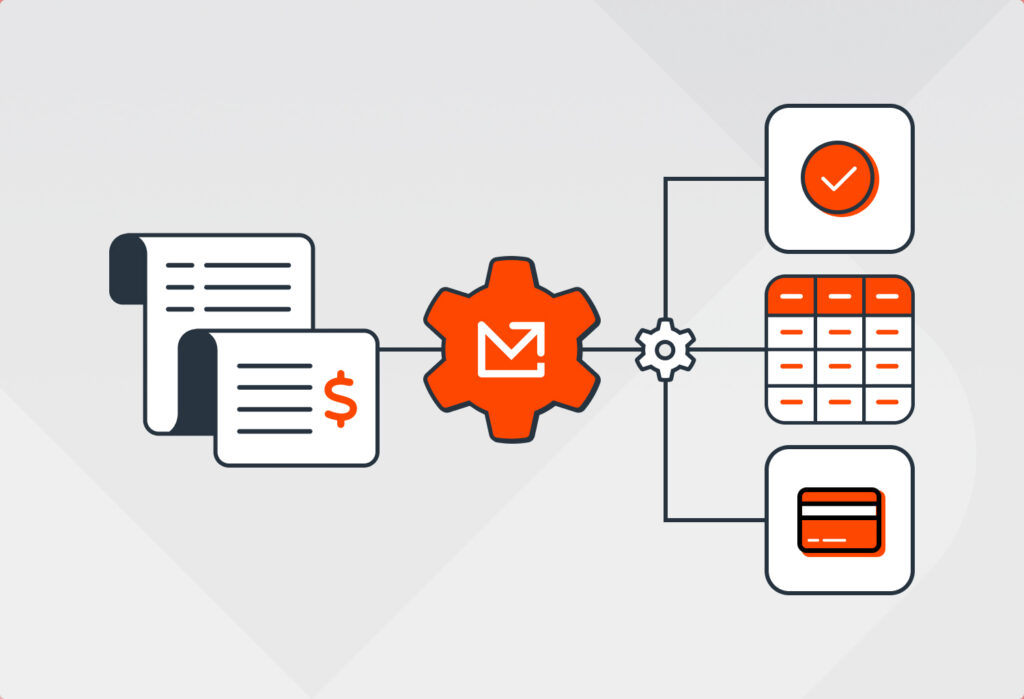
Accounts payable automation is the use of software technology to automate routine AP tasks such as invoice data capture, matching, validation, approval routing, and payment processing. It helps AP teams significantly reduce the time, effort, and cost associated with the invoice-to-payment cycle.
Furthermore, AP automation allows AP departments to handle higher invoice volumes without drowning in work and also strengthen vendor relationships.
How does AP automation work?
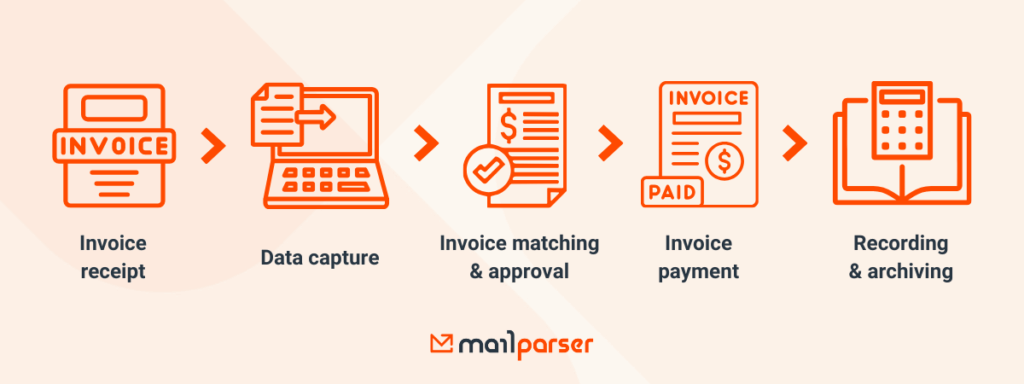
How AP automation is implemented may vary from one company to another, but generally, it follows this process:
- Invoice receipt: The business receives invoices from its suppliers, most commonly via email. Other channels include vendor portal, paper mail, or file transfers.
- Invoice data capture: This is a crucial step in AP automation. With the right Accounts Payable automation software, staff can automatically capture data fields such as invoice numbers, vendor names, order details, etc. To extract data from invoices, you can use email parsing, OCR (Optical Character Recognition), document parsing, AI, or a combination of those technologies.
- Invoice matching and validation: The Accounts Payable automation software checks the extracted data for accuracy and matches it against purchase orders and delivery receipts. This eliminates the need for manual matching (a huge relief) and helps AP employees detect discrepancies before sending an invoice for approval.
- Approval routing: Validated invoices are routed to the person responsible for approval via pre-defined workflows. Chances are, your accounting or ERP software already has this automation feature.
- Payment scheduling and processing: The automated AP system schedules payments according to due dates, vendor agreements, and the AP department’s cash flow strategy.
- Recording and archiving: The AP team records invoices in the accounting system or ERP system and stores them in a searchable archive for compliance and auditing purposes.
In essence, AP automation helps automate repetitive tasks in the invoice-to-payment cycle that consume time, lead to errors, and create bottlenecks.
What is an example of AP automation?
A common example of AP automation is automatically extracting invoice data from PDF invoices received by email, validating the data against purchase orders, routing the invoice for approval, and scheduling payment in an accounting or ERP system. AP automation software takes care of this process, and human intervention is kept to a minimum.
How Manual Workflows Drain Your AP Team
Manual AP tasks require a lot of time and attention to detail. As the business grows, employees may compensate by putting in more time and effort, but after a certain point, manual work won’t catch up with the volume of incoming invoices.
Common issues with manual AP workflows include:
- Time lost: Employees spend countless hours opening emails, downloading PDFs, and retyping invoice data instead of reviewing exceptions or managing approvals.
- High risk of errors: Manual work results in typos, misplaced amounts, duplicate entries, and other frequent errors.
- Delays in invoice payments: the AP team misses out on early payment discount opportunities, and vendors grow frustrated.
- Poor scalability: As invoice volume increases, so does the processing workload, leading to more delays and mistakes.
If an AP department doesn’t address those problems, their impact compounds over time, resulting in big financial losses.
The root cause here is manual data entry. Every validation, approval, and payment depends on accurate data. The best way to deal with data entry is to automate it, which is what Mailparser excels at.
Mailparser is a no-code email parsing solution that businesses use to extract data from emails and send it to their systems. A perfect example of this is PDF invoices received by email. In fact, parsing invoices is one of our most common use cases. Here is how it works.
Why More Businesses Are Adopting AP Automation
According to the Accounts Payable Automation Trends 2025 Report, conducted by the Institute of Financial Operations & Leadership, 63% of AP teams spend more than 10 hours per week processing invoices, and 66% are still manually entering invoice data into ERP systems.
However, manual work is giving way to automation. In fact, a study by Ardent Partners found that 48% of AP leaders listed automation as their top priority for 2025. More businesses are discovering the benefits of automation technologies, and AP departments are no exception. This means those who don’t embrace it will lag behind in efficiency and competitiveness.

So, what are the benefits of AP automation exactly? Let’s go over each one briefly.
Accelerate AP invoice processing and payment cycles
By automating tasks in AP invoice processing, from receipt to payment, AP departments reduce approval and payment cycle times. So they pay invoices on time and have more time for other activities.
Eliminate errors
Replacing manual data entry with automated data extraction helps AP employees avoid mistakes that take time and effort to fix. This reduces the cost of invoice processing and increases the accuracy of accounting records.
Cut down costs
Faster processing means lower labor costs per invoice, fewer late payment fees, and better access to early payment discounts, all of which directly improve cash flow.

Enhance visibility and reporting
AP automation provides real-time visibility into invoice status, outstanding liabilities, and spending patterns. This makes it easier to forecast cash flow, make decisions, and spot potential problems before they snowball.
Strengthen security and compliance
AP invoice automation centralizes data, reduces the risk of fraud, and creates clear audit trails. As a result, AP departments stay compliant with both internal control and external regulations.
Now that we have established what AP automation is, why it’s important, and the benefits you reap from it, it’s time to discuss how to implement AP automation solutions successfully.
How to Implement AP Automation
Successful implementation of AP automation solutions requires careful planning. It might feel overwhelming, but it doesn’t have to be. To make this process clear and structured, we recommend you follow the five steps outlined below.
1. Assess your AP processes and gaps
The first step is to map your current AP workflow in its entirety, from invoice receipt to payment and archiving. Identify bottlenecks, manual touchpoints that consume a lot of time, tasks with high error rates, and areas where delays or recertifications occur. Those are the tasks you want to automate. You want to design a workflow that clearly outlines which tasks to automate and which to handle manually.
2. Select the right Accounts Payable automation software
Your AP automation system may require more than one AP automation software, even if your current ERP or accounting system already offers AP invoice automation features. Take your time to choose Accounts Payable automation software that combines ease of use, automation capabilities, security, and scalability. Prioritize AP automation solutions that integrate easily with your system and can scale as your operations grow.
If the platform you use already has invoice automation features, but your biggest bottleneck is data entry, the only AP automation software you need is a data capture tool.
3. Automate invoice data capture
This is the cornerstone of AP automation. Subsequent workflows depend on having clean, structured invoice data in your ERP or accounting system: vendor name, invoice number, dates, amounts, etc. As shown above, email parsing is great for automated invoice data capture.

4. Configure automated workflows
Set up rules for every task you need to automate: 3-way matching, approvals, exception handling, and payment scheduling. Each workflow should follow conditional logic and include thresholds that determine when invoices are routed and to whom.
To be clear, you’re not going to automate everything. Some tasks must be performed by a human, like approving invoices, auditing transactions, and communicating with vendors.
Furthermore, this is where you assign clear roles and responsibilities to the people who will work with the automated AP system. Consider establishing access roles, compliance protocols, escalation rules, and audit trails.
5. Implement AP automation with appropriate communication and training
Proper implementation of any new technology requires effective communication and training. Introduce the new system with proper onboarding and documentation. Make sure that AP staff, IT staff, and stakeholders understand how the new workflows work and how they will benefit from them.
After implementing AP automation, keep monitoring and adjusting
To measure the impact of your automated AP system, be sure to track KPIs such as processing times, error rates, payment delays, and invoice processing costs. Use these insights to fine-tune workflows so the ROI of automation keeps increasing over time.
Kick Off AP Automation With Mailparser
If manual AP workflows are costing your team too much time and money, it’s time to embrace AP automation. Team members will process invoices faster, enhance data accuracy, and drive down costs.
Get started today by sending an invoice to Mailparser. Set it up in minutes to extract data automatically and send it straight to your accounting or ERP system. With invoice data capture, you’ll kick off your automated AP system.