What Is CRM Automation?
CRM automation refers to the use of software tools to automate simple but repetitive tasks within a CRM system. This includes the pillars of managing customer relationships: marketing, sales, and customer service. Think of tasks like data entry, setting reminders, updating deal stages, routing support tickets, etc.
CRM automation allows teams to nurture leads more effectively, close more deals, and improve the customer experience.
Most, if not all, industries stand to gain from automating repetitive CRM tasks. Some industries where organizations have achieved great success include healthcare, real estate, finance, insurance, retail, manufacturing, e-commerce, legal, and more.
Likewise, the public sector and nonprofit organisations use CRM-like tools to manage important data related to the public or donors, volunteers, stakeholders, etc.
Key features used in CRM automation tools
Nowadays, CRM platforms have built-in automation features. Depending on its needs, a business may use a CRM alongside complementary tools to automate CRM tasks and workflows.
An automated CRM system includes features such as:
- Lead capture
- Lead scoring and segmentation
- Task management
- Sales pipeline management
- Workflow automation
- Email marketing automation
- Notifications and alerts
- Reporting and analytics
- Integrations with other tools
- Customer data management
What Are the Benefits of CRM Automation?
The benefits of CRM automation are enhancing productivity and collaboration, increasing conversions, reducing sales cycles, improving customer satisfaction and retention, and surfacing actionable insights from data.
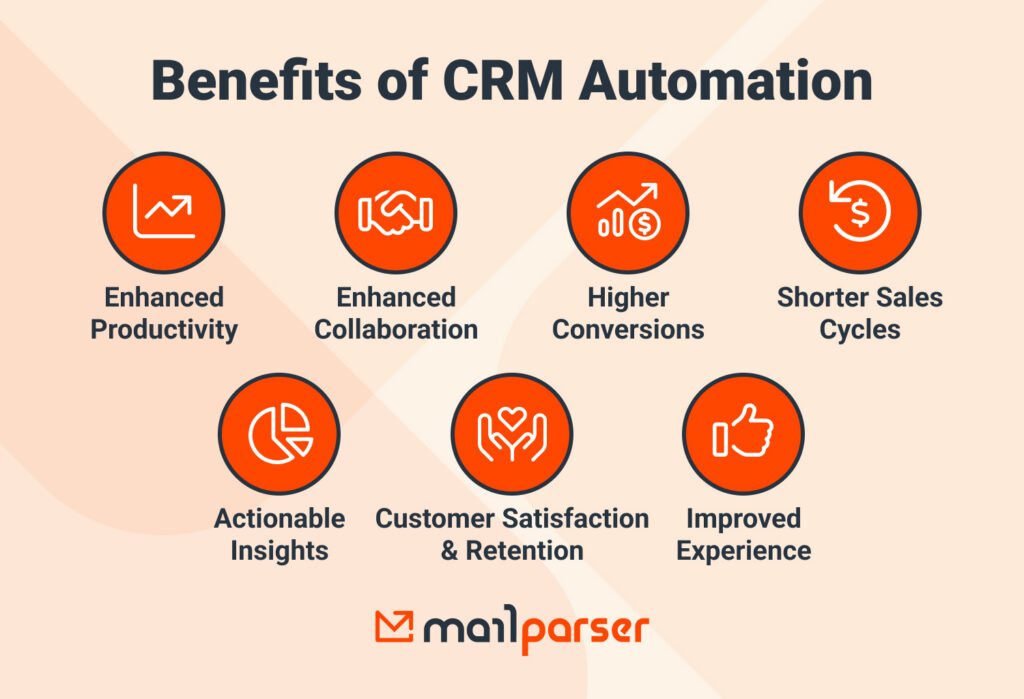
Let’s take a closer look at each benefit.
Enhanced productivity
CRM automation allows teams to spend less time on repetitive work and focus more on work that drives results:
- The sales team can capture leads faster, automate follow-ups, update deals, and much more. This allows sales reps to promptly connect with leads and spend more time guiding them through the sales cycle.
- The marketing team can capture, segment, score, and nurture leads. They also run automated campaigns and identify the most qualified leads. The best part of CRM marketing automation is being able to reach hundreds or even thousands of prospects quickly and easily through automated workflows.
- The customer service team can use AI chatbots to provide 24/7 support, personalize interactions, automate responses to common questions, and collect feedback. Plus, automation tools make it easier to track and manage support tickets.
Enhanced collaboration within and across teams
An automated CRM system provides a centralized platform that organizes and makes information accessible. It also takes care of routine tasks and prevents mistakes caused by tedious manual work. As a result, collaboration improves, both within teams and across teams and locations.
Higher conversions, shorter sales cycles
Sales reps move prospects through the sales pipeline faster, thus increasing conversion rates and shortening sales cycles. In other words, your business wins deals it would have lost or missed out on if everything were handled manually.
Improved customer experience, satisfaction, and retention
By taking advantage of a CRM’s automation capabilities and streamlining workflows, businesses can respond to customers faster, send personalized messages based on their history, segment, behavior, etc.
This improves the customer experience, leading to higher satisfaction rates and, in turn, better customer retention. People who feel valued and supported are more likely to stay loyal to your brand and recommend it to others.
Actionable insights enable better and faster decisions
Automation features in your CRM, such as automated reports and analytics, can quickly analyze customer data to give you actionable insights. Some insights worth investigating include:
- Best-performing lead sources
- Bottlenecks in the sales pipeline
- Customer segments that close faster or slower
- Signs of customer churn
- Upsell and cross-sell opportunities
These insights inform your future strategic decisions. Be sure to track metrics like the customer acquisition cost (CAC), average sales cycle length, average time to close a deal, customer satisfaction score (CSAT), churn rate, customer lifetime value (CLV), etc.
How to Automate Your CRM in 5 Steps
To automate your CRM, you need to identify repetitive tasks, pick the right CRM software for your organization, set up automated workflows, and integrate your CRM with complementary tools (if needed). After rollout, you want to continually test your CRM system, optimize it, and monitor results.
1. Identify repetitive tasks
First, you want to identify routine tasks that are time-consuming and error-prone, but don’t require much human judgment. Common culprits include entering data, sending follow-up emails, creating tasks and reminders, etc. These repetitive and rule-based tasks are easy to automate.

2. Choose the right CRM software
If you already use a CRM platform, explore its automation features (in key areas like lead management, marketing, sales pipeline, customer service, etc.). If you use a simpler tool, like spreadsheets, you might want to transition to a dedicated CRM solution. In any case, you need a CRM that suits your workflows and automation needs.
So take the time to test and compare options. Consider ease of use, CRM features, automation capabilities, integrations with your other tools, scalability, security, and cost.
3. Set up automated workflows
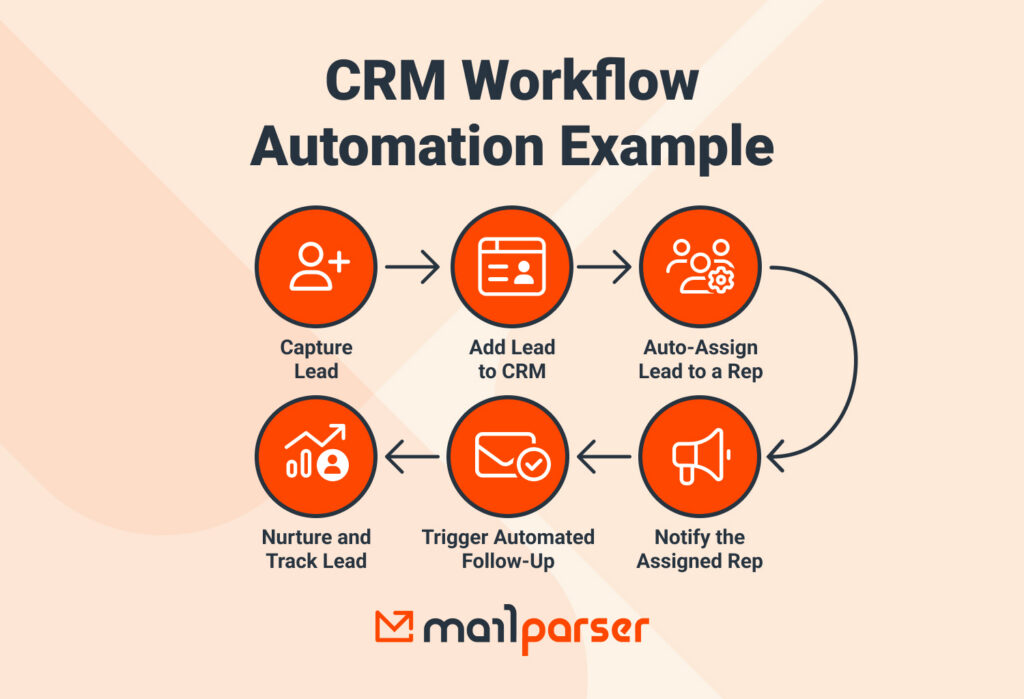
This is where the value of CRM and marketing automation comes in. Here are some examples of workflows you can automate:
- Capture lead data from incoming emails or forms.
- Send follow-up emails or messages to leads.
- Score leads based on pre-defined criteria.
- Create and assign tasks to sales reps.
- Nurture leads with automated email campaigns.
- Update the deal stage, notify the assigned sales rep, and assign the next action.
- Support tickets are logged and routed to the support team, and unresolved issues are escalated to managers.
4. Integrate with other tools
To automate workflows, you will likely need to connect your CRM to other tools you use. Common examples include Google Workspace (Gmail, Calendar, Forms, etc.), eCommerce platforms, CMS platforms, help desk software, integration platforms like Zapier, and data extraction tools.
By integrating your CRM with your systems, you minimize manual workflows, sync data across platforms, and enhance overall productivity and collaboration.
5. Test, optimize, and monitor
Once your automated CRM workflows are up and running, your work isn’t over. Keep tracking results to refine workflows and improve performance. Small improvements over time can drive significant gains in efficiency and conversions.
A Few Industries That Benefit a Lot from CRM Automation
As we said earlier, most, if not all, industries can benefit from automating CRM tasks and workflows. Here, we focus on three industries that see a great impact from implementing CRM automation tools: insurance, healthcare, and real estate.
Insurance
Insurance companies deal with large volumes of leads, quotes, and policy updates every day. When handling everything manually, agents can get stuck for hours typing information found in emails, PDFs, and other sources. This results in lost opportunities, since timely responses are crucial for converting leads into customers.
CRM automation helps overcome this challenge by capturing leads from multiple sources into a centralized system. Upon adding lead info, automated workflows will kick in, triggering the next steps in lead management: assigning leads to agents, sending notifications, sending follow-ups, and so on.
Furthermore, automation also ensures that policy renewals, claims, and customer communications are consistent and accurate.
Further reading: ”How to Manage Insurance Leads With Mailparser: Case Study”
Healthcare
Healthcare providers and clinics rely on timely communication, accurate patient data, appointment scheduling, follow-ups, and coordinated care across teams. CRM automation centralizes patient information, reminders, post-visit communications, and other information.
This reduces administrative burden and streamlines daily processes. Healthcare teams are less stressed, make fewer mistakes, and can focus more on patient care. Additionally, real-time data and analytics help providers make better decisions, identify potential issues early, and improve overall patient outcomes, satisfaction, and long-term engagement.

Real Estate
Real estate professionals acquire leads from listing websites, emails, open houses, referrals, social media, and other sources. Managing those leads efficiently makes all the difference between winning and losing deals. As you can imagine, automation is a big boon for brokerages. In fact, those who have yet to adopt it risk falling behind.
Specifically, when a real estate brokerage automates CRM workflows, it becomes better equipped to assign leads quickly, nurture prospects with personalized follow-ups, track interactions across the sales cycle, segment clients, keep communicating with them after closing a deal, and more.
Overall, agents close deals faster, maintain good relationships with clients, and stay on top of their pipeline without getting bogged down in manual tasks.
Further reading: “How to Generate, Capture, & Manage Real Estate Leads Like a Pro”

Frequently Asked Questions About CRM Automation
How does CRM automation help my business?
CRM automation helps employees save time, reduce errors, and uncover data-driven insights. By relieving sales and marketing teams from repetitive tasks, automation allows them to focus on more important activities that drive revenue and growth.
What tasks can be automated in a CRM?
Many CRM tasks can be automated: lead capture, lead scoring, lead assignment, follow-up reminders, customer service, thank-you emails, drip campaigns, referral requests, report generation, task management, support ticket routing, and many more.
Can small and medium-sized businesses (SMBs) benefit from CRM automation?
Yes. It’s not just enterprise-level businesses that benefit from CRM automation. Small and medium-sized businesses can use it to reduce manual work, manage leads more effectively, and grow without increasing headcount.
What is the difference between CRM automation and marketing automation?
Marketing automation focuses on top-of-funnel tasks like lead generation, email campaigns, and nurturing. CRM automation covers a broader scope, including sales and customer service functions like contact management and reporting. While often used interchangeably, they’re different yet complementary, working together to drive sales and improve customer experience.
How do I choose the right tool for CRM automation?
Consider your workflow automation needs, must-have features, integration with your systems, ease of use and collaboration, data security and privacy, your budget, and scalability.
Can I integrate CRM automation with other tools?
Yes, most CRM platforms allow for integration with other business tools. Using integrations helps you automate workflows that involve two or several tools.
How can I measure the success of CRM automation?
To measure the success of CRM automation, track the following metrics:
- Time saved on repetitive tasks.
- Number of leads followed up automatically.
- Increased sales conversions.
- Improved customer satisfaction and retention.
Capture Leads With Mailparser and Automate Your CRM
CRM automation helps you boost productivity, enhance the customer experience, work, and build more efficient, scalable processes across marketing, sales, and customer service. But it all starts with one thing: getting your data into your CRM accurately and consistently.
That’s where Mailparser comes in. Whether you manage leads on a Google sheet, Salesforce, or any CRM, Mailparser automatically captures lead data from incoming emails (including attachments) and sends it to your system. As a result, you automate data entry, prevent errors, and speed up the next actions — assigning leads, notifying team members, triggering follow-ups, and so on.
By combining Mailparser with your CRM automation tools, you can capture leads in real time, trigger follow-ups instantly, and keep your pipeline moving without friction. Automate lead capture today and unlock the path to CRM automation.