What Is Purchase Order Management?
Purchase order management is the process of creating, approving, tracking, and managing purchase orders. It covers the entire procure-to-pay process, from requesting a purchase internally to paying the supplier.
But first, what is a purchase order?
A purchase order (PO in short) is a formal document issued by a business to a supplier of goods or services. It includes the PO number, the contact information of the buyer and seller, the items to be purchased, their quantities and prices, shipping address, delivery dates, and other terms. Once accepted, a purchase order becomes a legally binding contract between buyer and seller.
Below is an example of a purchase order:
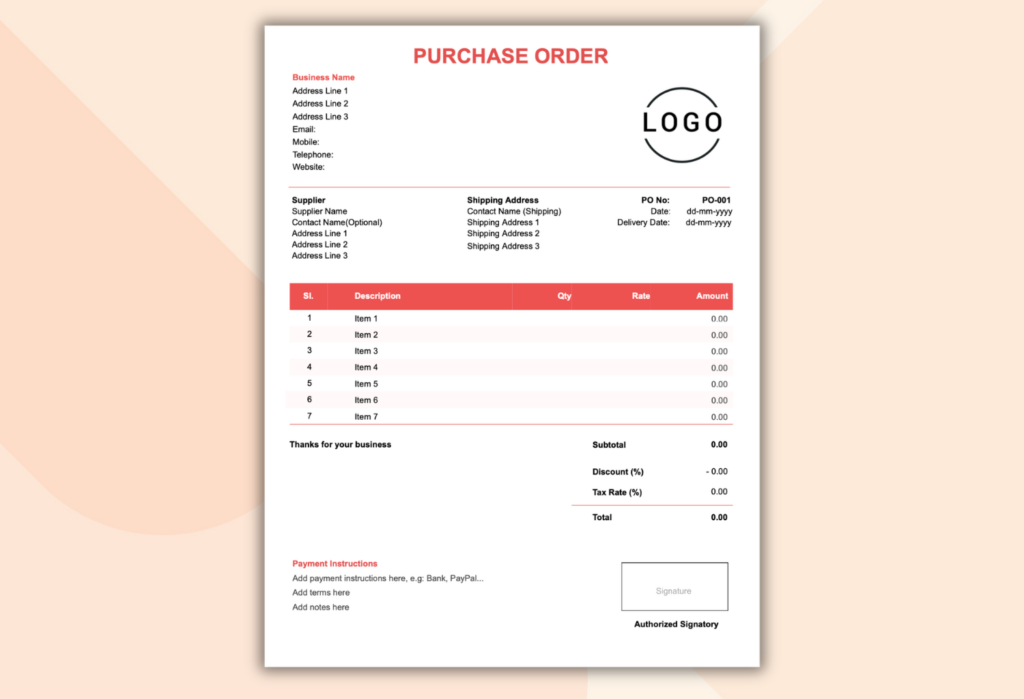
Purchase order template from InvoiceTemple.
What are the types of purchase orders?
- Standard PO: A one-time purchase with specific details (items, quantities, prices, delivery dates, etc.).
- Planned PO: This PO is issued for future purchases without a confirmed delivery date. It estimates the order details so the supplier can prepare them in advance.
- Blanket PO: A long-term agreement that allows for recurring purchases over a set period. It allows the buyer to take advantage of pre-negotiated pricing and terms across multiple orders.
- Contract PO: Establishes a legal agreement with terms and conditions, without specifying items, quantities, or prices.
Here’s why PO management matters
Managing purchase orders is necessary for several reasons. First, it gives the procurement department full visibility into the purchases made by the company. This means it can track spending and create a procurement budget that matches the business’s needs.
Additionally, good management of POs ensures clear communication with suppliers. It also creates a clear audit trail, facilitating compliance with both internal policies and external regulations.
In the absence of proper purchase order management, many issues will arise: data entry errors, mismatches with invoices, spending that goes over budget, mistakes that lead to disputes with vendors… your business is better off without these situations.
This is why you need a clear and documented purchase order management process in place.
What Is the Purchase Order Management Process?
The purchase order management process is a sequence of steps that starts with identifying a need for procurement, continues with the creation, approval, and issuance of a PO, and ends when the purchase is formally closed and recorded.
Following this process ensures that procurement stays smooth and all purchases are trackable.
Here are the seven steps that comprise the purchase order management process:
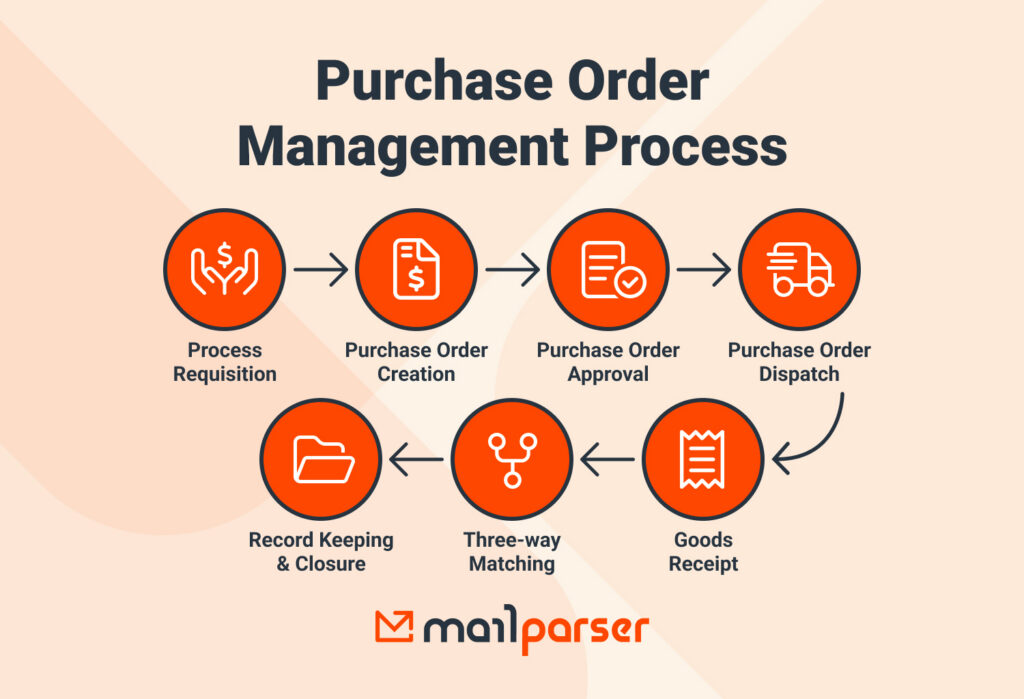
Let’s break each step down.
Step 1. Purchase requisition
When a department identifies a need to purchase goods or services, it submits an internal request to proceed with the purchase to the procurement department. This is called a purchase requisition, and outlines what to buy, how much it will cost, and why it is needed. This step prevents unauthorized or unnecessary spending.
Step 2. PO creation
After approving the requisition, the procurement department creates a purchase order with all the necessary details: buyer and vendor info, items, quantities, pricing, totals, payment terms, delivery terms, and more if required.
Step 3. PO approval
In this step, an approver (most often, a department manager) will review the PO to confirm that the purchase is needed, within budget, and made with an approved vendor. They also review the PO itself for errors.
Step 4. PO dispatch
After approval, the company sends the PO to the vendor via email or a procurement system. The supplier reviews and confirms the order, formally accepting the terms.
Step 5. Goods receipt
When the supplier delivers the goods or services, the buyer verifies that the order matches what they requested. This confirmation is recorded as a goods receipt.
Step 6. Three-way matching
In this crucial step, the accounts payable team compares the goods receipt against the purchase order and invoice. When the three match, the AP team approves the invoice and moves forward with payment.
Step 7. Record keeping and closure
Lastly, after the vendor is paid, the AP team marks the transaction as complete in the books and archives it. This is important both for financial reporting and maintaining historical data for forecasting needs, as well as making informed purchasing decisions in the future.
The Benefits of Purchase Order Management
Managing purchase orders effectively improves financial control and budgeting, operational efficiency, and vendor relationships. It also helps surface new insights from data and creates clear audit trails.
1. Enhance financial control and budgeting
Purchase orders give departments visibility into where their spending budget goes. Every invoice can be tracked back to the purchase order created for it, which helps keep clear financial records.
Also, the PO approval workflow prevents unauthorized spending as well as overspending and surprise budget overruns.
2. Improve operational efficiency
A standardized purchase order process will prevent many issues:
- Unnecessary or duplicate order
- Invoice discrepancies
- Slow PO approvals
- Slower invoice processing
- Misunderstandings between your suppliers and your business
With these issues out of the way, procurement of goods and services runs smoothly, which in turn helps your business deliver your products or services to your customers without disruption.

3. Improve vendor relationships
Accurate POs mean fewer mistakes and even fewer disputes with vendors. They receive correct order details, deliver what was ordered, and get paid on time. Over time, this good relationship gives you perks such as priority service and negotiating more favorable rates.
4. Uncover data-driven insights
Accurate PO records can contain valuable data waiting to be discovered. Specifically, you can analyze spending patterns, evaluate supplier performance, identify volume discount opportunities, and make more informed decisions based on historical trends.
5. Streamline audit trails
When you record all purchases digitally, you create a complete trail of transactions, from request to payment. This improves transparency, simplifies compliance reporting, and ensures your business is always ready for both internal reviews and external audits.
Now that we’ve established how important PO management is, let’s discuss some best practices that help you implement it effectively.
Best Practices for Purchase Order Management
Best practices for purchase order management include standardizing processes, having an approval hierarchy, digitizing records, automating data entry, integrating tools with each other, and auditing.
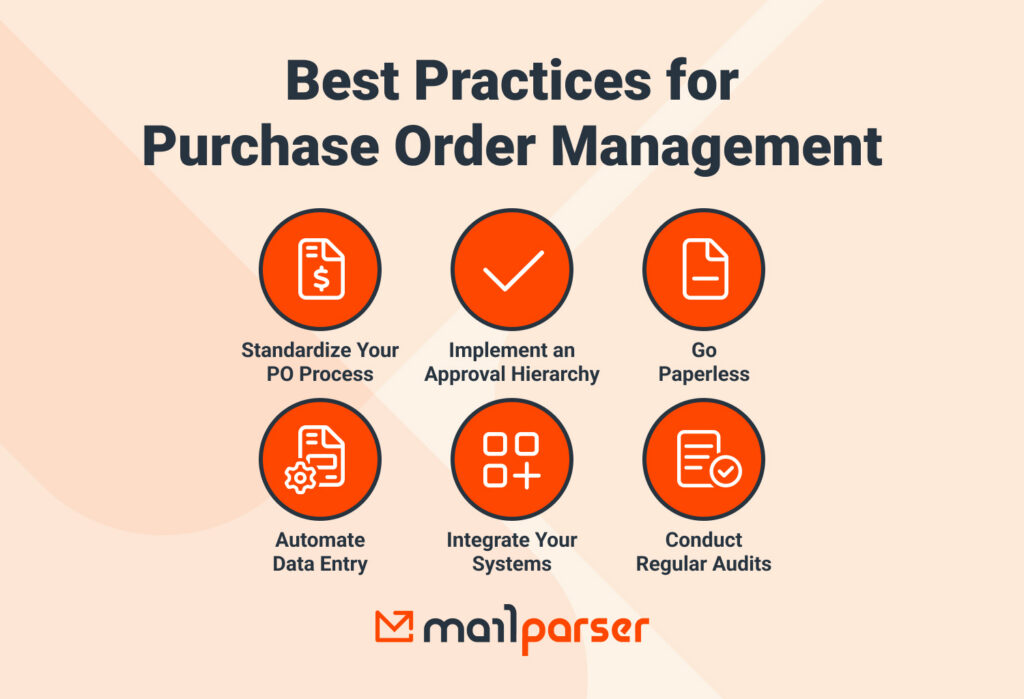
Standardize your PO process
Create a uniform system that every department follows. Use consistent templates, require the same information on every order, and establish clear rules for when a PO is necessary. Standardization eliminates confusion, makes training easier, and ensures that no critical details slip through cracks.
Implement an approval hierarchy
Design approval workflows based on order value and department authority. Small purchases might need only a team lead, while larger commitments require finance or executive sign-off. This hierarchy prevents bottlenecks by routing orders to the right person automatically while maintaining financial oversight.
Go paperless with digital storage
Abandon filing cabinets and physical storage. Digital POs are searchable, accessible from anywhere, and impossible to lose. Cloud storage solutions also simplify compliance by automatically backing up records and retaining them for required time periods.
Automate data entry
Manual data entry is the biggest source of errors and delays in PO processing. Use tools that automatically extract information from emailed POs and populate your accounting system or spreadsheet. Automated data extraction frees your staff from hours of manual work each week and eliminates errors that lead to payment disputes.
Integrate your systems
Connect your purchase order management software with your accounting, inventory, and/or ERP system. Proper integration ensures everyone works with the same information, prevents duplicate data entry, and creates a seamless flow from order to payment. In contrast, disconnected systems create silos that hide problems and keep them growing — until the business suffers a major operational and financial impact.
Conduct regular audits
Review your PO process periodically to identify bottlenecks, recurring errors, or outdated approval thresholds. Audits reveal whether vendors are consistently meeting terms and whether internal teams follow established procedures. Use the insights you uncover over time to refine your workflows.
Frequently Asked Questions About Purchase Order Management
What is the difference between a purchase order and an invoice?
A purchase order (PO) is issued by the buyer before goods or services are delivered, detailing what they will buy and under what terms. An invoice, on the other hand, is issued by the supplier after delivery, requesting payment for the goods or services provided. In other words, a purchase order authorizes a transaction, while an invoice requests payment for it.
What are common challenges in PO management?
The most common challenges in PO management are manual processing, slow approvals, three-way matching discrepancies, poor visibility on spending, and budget overruns. These issues multiple as procurement needs grow, causing more errors, bottlenecks, and financial losses. Purchase order automation helps overcome these challenges effectively.
Can purchase order processing be automated?
Yes, you can and should embrace purchase order automation by using purchase order management software that can automate workflows and integrate with your accounting or ERP system. Specifically, the right software will include a digital purchase requisition system, generate and route POs for approval, send them to vendors, perform invoice matching, track order status, and sync information across systems.
Struggling With Purchase Order Data Entry? Try Mailparser
If your team is still copying purchase order details from emails or PDF attachments into spreadsheets or accounting systems, they are losing valuable time that could go into more productive tasks. With a median cost of $100 per purchaser order, manually managing POs can quickly become very expensive. Automating data entry can significantly reduce that cost.
To record purchase order data efficiently, look no further than Mailparser. Procurement teams use it to extract PO details (PO number and date, vendor info, line items, total amounts, etc.) in a matter of minutes instead of hours. By automating data entry, they streamline the purchase order process and reduce human error. Try it today by sending an email with a PO attachment and take the first step towards purchase order automation.