What Is an Email API?
First, let’s break down the acronym: API stands for Application Programming Interface.
An API is a set of rules that allows two web applications to communicate with each other. One way to do this is to use a webhook, which is an automatic, event-based transfer of data from one system to another via an HTTP request.
So an email API is a web API that connects an app or service to an email service provider (also called ESP). Instead of going to your inbox or writing code to handle routine email workflows, your application can communicate with an email service through simple API requests.
In practice, an email API allows you to:
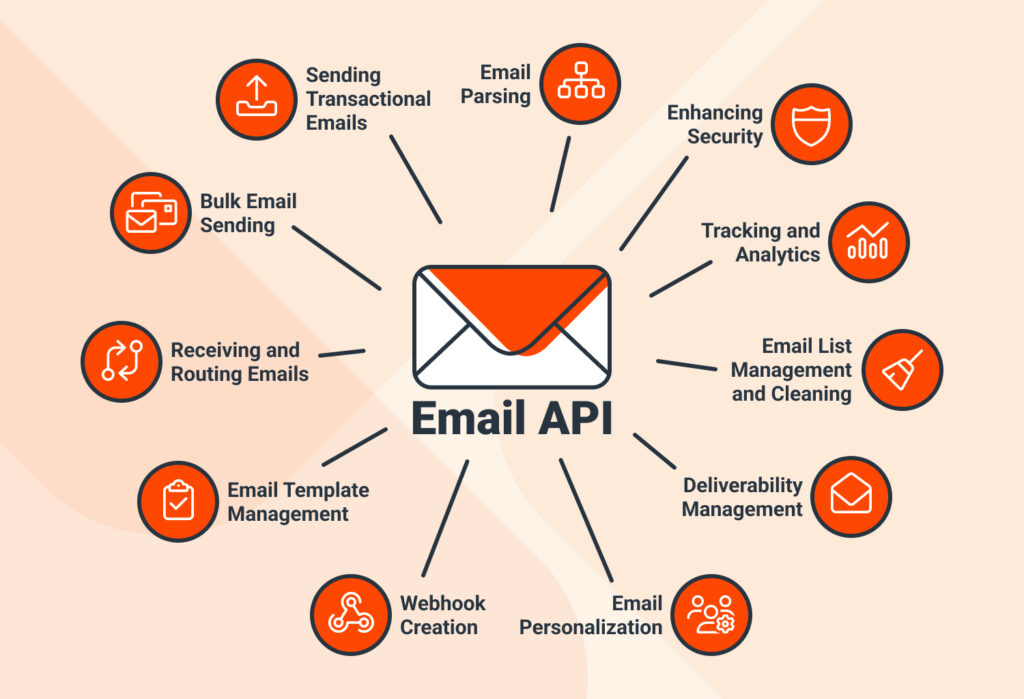
- Send transactional messages like order updates or password resets.
- Receive and route incoming emails to your application.
- Send personalized emails based on pre-built templates and dynamic data
- Manage and clean your email list
- Monitor email deliverability
- Analyze metrics
- And more
Here is a more comprehensive overview of what an email API can do:
While email APIs are usually built by and for developers, some email API service providers offer low-code or no-code platforms with pre-built workflows, email API integrations, and simple routing rules.
Email API vs SMTP – What’s the difference and which to choose?
SMTP (short for ‘Simple Mail Transfer Protocol’) is the traditional method for sending emails, using a straightforward command flow that’s easy to set up and troubleshoot, but it can be slower and less scalable for high-volume sending.
Email APIs, on the other hand, allow applications to send, receive, and manage emails programmatically, offering faster delivery, real-time analytics, and advanced features like templating and automation.
So SMTP can work for you if you have a simple email setup, don’t need automation, and are sending a low volume of messages. But if you need faster delivery, scalability, and seamless integration with other tools, then email APIs are the way to go.
What Are the Types of Email APIs?
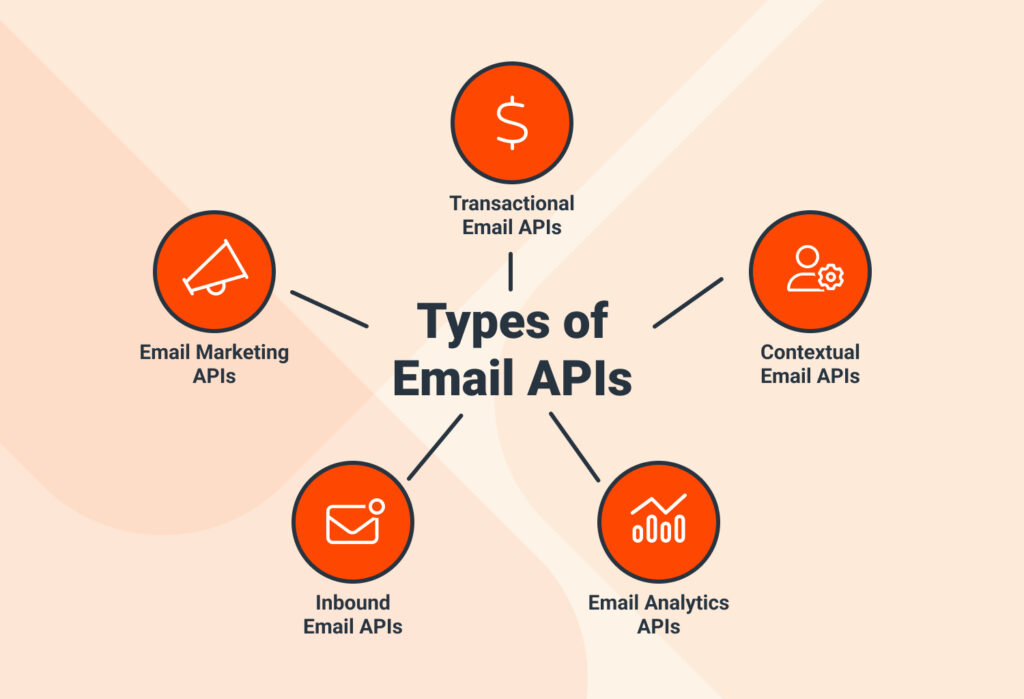
Broadly speaking, one can divide email APIs into the following categories (based on functionality):
1. Transactional email APIs
These APIs are designed for sending automated, one-to-one emails triggered by specific user actions, such as account sign-ups, password resets, or purchase confirmations. They prioritize reliability and deliverability to ensure messages reach recipients promptly, and often support dynamic templates, personalization, and detailed delivery tracking to maintain user engagement and trust in automated workflows.

2. Email marketing APIs
These APIs are tailored for sending large-scale campaigns or newsletters to multiple recipients at once. They provide features for audience segmentation, scheduling, A/B testing, and performance tracking, enabling businesses to optimize engagement and measure campaign effectiveness. Compliance with anti-spam regulations is also a key consideration, ensuring that outbound emails are delivered without being blocked or flagged.
3. Contextual email APIs
These APIs enable the delivery of highly personalized messages that adapt to a recipient’s behavior, preferences, location, device, or stage in the customer journey. They often combine triggers, segmentation, and analytics to dynamically adjust content in real time, ensuring that each email feels relevant and tailored to the individual, which increases engagement and the likelihood of conversion.
4. Inbound email APIs
Inbound APIs focus on programmatically receiving and processing emails sent to your application. They allow you to send email content to your systems and trigger automated workflows in real time. This makes them ideal for support ticket systems, form submissions via email, or any scenario where incoming messages need to be handled dynamically without manual intervention.
5. Email analytics APIs
These APIs provide detailed insights into how sent emails are performing, tracking events such as opens, clicks, bounces, and unsubscribes. They typically deliver data in structured formats for reporting and analysis, allowing marketers and developers to integrate engagement metrics into dashboards, optimize campaigns, and make data-driven decisions about email strategy.
So these are the five main types of email APIs.
A much less common form of email APIs is parsing APIs, which can extract data from emails in a structured format. They are rare because accurate extraction requires advanced email processing. That’s why users who need to parse emails use specialized tools like Mailparser.
How Email APIs Work and Why Businesses Need Them
To give you a concrete idea of how an email API works, here is a common use case broken down into steps.
Suppose a customer places an order on an e-commerce website. An email API can automatically generate and send a confirmation email without manual intervention. Here’s how the workflow typically works:
- Trigger & Request: The backend system detects the event and sends an HTTP POST request to the email API. This request contains structured data (like customer name, items purchased, total amount, and shipping details) in JSON format and specifies the email template and any dynamic variables.
- Processing & Personalization: The email API receives the request, authenticates it using an API key or token, and validates the data. It then merges the dynamic content into the chosen email template to create a personalized, ready-to-send email.
- Sending & Delivery: The API delivers the email using its internal sending infrastructure, which may include SMTP relays. It handles retries automatically in case of temporary delivery failures to ensure the message reaches the recipient’s inbox.
- Tracking & Feedback: To monitor engagement, the email includes tracking pixels and unique links. Each open, click, or bounce triggers an event that is sent back to the API via webhooks, giving the backend real-time feedback on email performance.
- Customer Receipt & Business Insight: The customer receives a fully personalized order confirmation in their inbox, while the business gains immediate insights into delivery status, opens, clicks, and other engagement metrics to measure effectiveness and optimize future communication.
So, with this in mind, when should you start using an email API service?
Signs that your business needs an email API:
- Your business has grown a lot, and you send large volumes of transactional or contextual emails.
- You want automated workflows triggered by user actions.
- You need your email data to integrate with other systems.
- Manual email handling is slowing down operations or causing errors.
If the scenarios above apply to you, it’s time to look for an email API provider. The more your business grows and the more it will need an email API. In major organizations, they’re the backbone of automated email workflows that run reliably and at scale.
Benefits of Using Email API Services
We’ve already touched on how an email API can benefit a company once it reaches a certain size. Here is a more comprehensive list of the benefits of using email API services to automate and scale your email workflows:
- Sending and receiving emails is easier. Email APIs can send, receive, and route messages programmatically, eliminating the need to handle routine emails manually. Plus, email API integrations connect emails with other tools like CRMs, ERPs, or analytics platforms, fitting easily into your tech stack.
- Better deliverability. Email deliverability is a common issue. Thankfully, email APIs often include an email validation API, which can remove invalid or bounced email addresses before sending campaigns. This cleans your list and improves your deliverability and sender reputation, so your emails land in spam folders less often.
- No need to invest in hardware and infrastructure. Using an email API provider’s servers is far more cost-efficient than building and maintaining your own email infrastructure.
- Personalized emails. You also enhance your ability to send personalized campaigns based on browsing history, purchasing preferences, etc. Personalization is a proven driver of higher conversions and engagement.
- Scalability. As your business grows, email APIs can handle thousands or even millions of messages without slowing down your operations. There’s no need to worry about server capacity or email queuing issues, making it a necessity for large companies.
- Analytics and insights. Most email APIs give you detailed engagement data, including opens, clicks, and delivery rates. With these insights, you’ll optimize your email campaigns and improve ROI over time.
- Enhanced security. Reputable email API providers offer robust security features such as authentication, encryption, and compliance with data protection standards, ensuring your email communications remain safe and trustworthy.
Overall, once you determine that you need an email API and start working with a provider, your email workflows will become more efficient, personalized, and scalable.

But wait… what if my incoming emails contain unstructured data I need to route?
What if you receive unstructured emails that contain important information which you need to route to your systems?
We mentioned parsing APIs earlier — they’re designed for this type of need. Maybe you receive invoices, applications, booking requests, lead inquiries, or some other important information via email. Or maybe your operations hinge on documents that you receive by email because it’s the sole method your partners use. And then there are also cases where you need structured data to build automated workflows.
If you need to parse emails regularly, your provider might not be able to provide that specific functionality. In that case, you will have to use a specialized tool to move data from emails to your systems.
The Biggest Limitation of Email APIs, and How Mailparser Solves It
Most email API providers are built primarily for sending, receiving, and routing emails. They can’t identify an order total from an invoice or pull a lead’s name from an email body. This leaves users stuck with manual data entry, workflow bottlenecks, and potential data errors.
This is where an email parser can shine. It can complement an email API when you need to extract specific, structured data points from incoming emails.

If you have been encountering this issue, Mailparser is for you. It takes the emails your API receives (along with their text, tables, or attachments) and automatically converts them into clean, structured data. Instead of building parsing APIs, Mailparser lets you build point-and-click rules that extract relevant data fields. Then it sends those results to CRMs, ERPs, spreadsheets, or automation tools in real time.
Benefits of parsing emails with Mailparser
Businesses rely on Mailparser for their email parsing needs.
- Parse unstructured emails (including attachments) without coding.
- Higher data accuracy. Mailparser lets you customize the parsing process so that data is extracted without inaccuracies.
- Save time. Turn hours of manual data entry into minutes of data extraction and free up your time for higher-value tasks.
- Build automated end-to-end workflows where incoming emails reach your email API, get parsed by Mailparser, and then flow into your downstream systems to trigger the next action.
Use case: parsing invoices received via email API
Many businesses receive invoices directly by email. An email API can collect these messages and send them to your application, but in most cases, it won’t be able to extract the data inside the invoice.
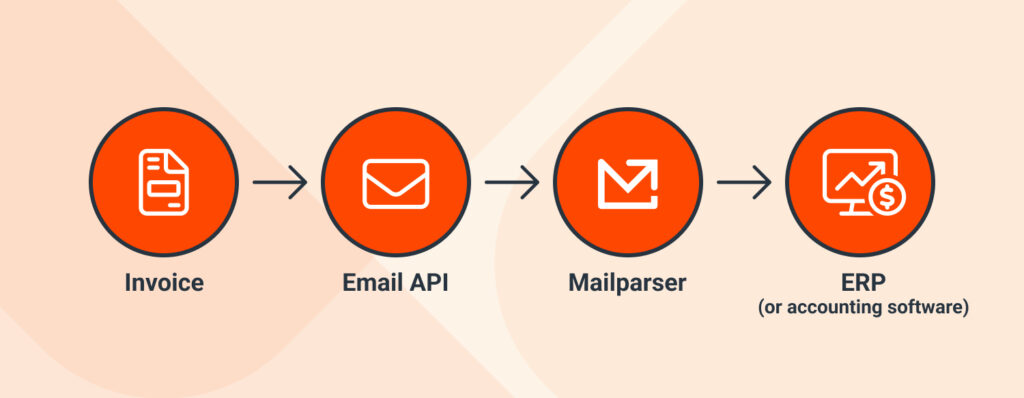
With Mailparser, though, those incoming invoices are automatically parsed into clean, structured fields like vendor name, invoice number, line items, totals, and due dates. The extracted data is then sent to your accounting software, ERP, or spreadsheet. So there is no need to waste time copying and pasting data or risk typing incorrect data. This turns a tedious back-office task into a fully automated workflow.
In Conclusion
By now, you have a clear understanding of what email APIs are, how they work, and how your business can benefit from using one. They connect your email service providers and your applications to send, receive, and route emails programmatically. Typical examples include account sign-ups, password resets, support tickets submissions, etc,
Email APIs become essential when businesses need to automate email workflows, ensure fast delivery at scale, enhance personalization and analytics, and more. But when parsing emails is required, using a specialized email parser like Mailparser can complement an email API beautifully. If you need to turn incoming emails into structured data and send it to your systems, quickly and without data inaccuracies, sign up today for a free trial and discover the efficiency of email parsing. You will no longer lose time inputting data manually; instead, you will gain a valuable tool to build automated email workflows.