
Black Friday Sale
Save 40% on Mailparser plans
Monthly plans MPSAVE40M Yearly plans MPSAVE40Y
For first-time subscribers onlyOffer ends Dec 6See terms

Logistics Automation: A Quick Guide & How to Get Started

Last Updated: November 20, 2026

Table of Contents

Automatically Extract Data From Emails

Capture data from incoming emails and send it to spreadsheets, Google Sheets, databases, APIs, integration services, and more.

No credit card required

Logistics providers often struggle with shipment delays, inaccurate updates, disconnected systems, and other issues that arise from manual processes. When left unaddressed, these challenges eat away at customer satisfaction and the business’s bottom line. The solution to streamline processes and keep up with demand is, you already guessed it, investing in logistics automation.

While logistics automation brings to mind warehouse robotics, it also covers other areas such as order processing, inventory management, shipment tracking, route optimization, and moving data between business systems.

In this guide, we examine what logistics automation is, which processes can be automated, the benefits and challenges of implementing automation, and the easiest place to get started: automating data entry workflows with email parsing.

Key Takeaways

  • Logistics automation uses technology, software, robotics, and AI to automate processes such as warehouse operations, transportation, order processing, inventory tracking, document processing, data analytics, and more.
  • Automating logistics processes lowers manual work, minimizes errors, improves inventory visibility, reduces shipment delays, bridges disconnected systems, and facilitates scaling.
  • Common logistics automation challenges include high implementation costs, limited technical expertise, legacy systems, and adoption of automation. Careful planning and gradual deployment are essential for a successful implementation.
  • The easiest place to start implementing logistics automation is to automate manual data entry. Email parsing allows you to extract data from email attachments, like delivery notes, into your system quickly and without errors.

Capture Data from Emails Effortlessly

Save countless hours of tedious data entry and streamline your workflows.

No credit card required.

What Is Logistics Automation?

Logistics automation is the use of technology to perform logistics tasks with little human intervention. Technology includes software systems for areas like order processing and inventory management, as well as machinery such as autonomous mobile robots used in warehouses, and more recently AI technologies.

The goal isn’t necessarily to automate an entire logistics operation, but rather areas that are inefficient and costly. Companies can implement automation in simple but important workflows at first, and then gradually expand it as they see positive results.

What Processes Can Be Automated in Logistics?

Key processes that companies can currently automate include warehouse logistics automation (using autonomous robots), order processing and fulfillment, inventory management and tracking, and document processing.

Warehouse automation

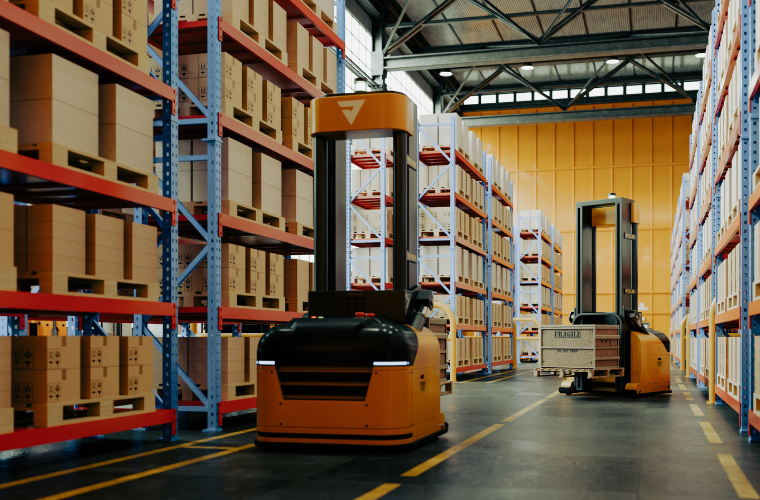
This is the most widely known example of automation in logistics. Warehouse automation is the use of machines and robotics to move, store, sort, and retrieve goods with little to no human labor.
Logistics Automation - Warehouse Robotics

Common examples include automated storage and retrieval systems (AS/RS), autonomous mobile robots, conveyor and sortation systems, automated picking systems, and more. Those machines and robots use a combination of sensors, navigation, wheels, tracks, grippers, and other equipment to move around and perform their tasks.

Order processing

Companies use automation software to capture order details from emails or documents and enter them into their order processing system. Once the data lands on the systems, it verifies product availability, processes payment, confirms the order, reserves the required stock, and initiates fulfillment.

Automating order processing goes a long way to reduce manual work, minimize mistakes, and accelerate order fulfillment.

Inventory management and tracking

Proper inventory management is necessary to avoid both stockouts and overstocking. Automated systems help optimize stock levels with little human work. Specifically, they can: 

  • Update inventory records automatically.
  • Monitor stock levels in real time.
  • Trigger replenishment alerts when stocks run low.
  • Track shipments in transit.
  • Identify discrepancies between records and actual stock levels.

This helps businesses maintain visibility across the supply chain, prevent stockouts and excess inventory, and significantly reduce financial losses. Plus, automation is particularly valuable when transporting perishable goods or essential medications.

Document and email processing

Every day, employees receive documents such as bills of lading, freight invoices, shipping orders, delivery notes, and more. The information inside those documents is essential for organizing shipments, updating inventory records, tracking delivery status, and processing payment.

They no longer have to spend hours every week manually copying or entering information. Instead, they can use dedicated tools to capture key data from documents into their systems quickly and without errors.

Parse Email Attachments - Transparent

By automating key processes, businesses can solve major challenges that hurt their competitiveness and bottom line.

Major Challenges That Logistics Automation Solves

Running a logistics business is complex and challenging daily. Major challenges that providers face include inventory management and tracking, administrative work, data inaccuracies and delays, and disconnected systems.

  • Inventory management and tracking: Manual tracking can cause inaccurate stock records, stockouts, and overstocking. Automation updates inventory data in real time, tracks goods, and triggers replenishment alerts.
  • Time-consuming administrative work: Every shipment has paperwork attached to it. Entering the information found in documents into business software takes time, potentially leading to delays. Automating that workflow saves employees countless hours of low-value work.
  • Poor data quality and delays: Incomplete or incorrect data can disrupt workflows and delay shipments. Automated data extraction solves this by converting documents and emails into accurate data that can be used immediately. As data quality improves, so does decision-making and the actual time of arrival of goods.
  • Disconnected systems and data silos: Teams sometimes work with inconsistent or outdated information due to isolated tools and systems, leading to mistakes and issues that escalate. Automation can be used to build a unified ecosystem that keeps data consistent and facilitates coordination.

The benefits of logistics automation are clear, but implementing it can be a challenge in and of itself. So it’s recommended to tackle one area at a time, starting with simple but repetitive workflows that take a toll on employee productivity. One such area is manual data entry.

How to Extract Logistics Data from Emails

A common issue for logistics teams is keying in information received via email into an ERP, WMS, TMS, or other systems. This costs employees a lot of time and becomes overwhelming when dealing with larger volumes of data.

The good news is that extracting data from email attachments (or body) is very easy and quick when using an email parser. Essentially, you will replace manual data entry with this automated workflow:

1. Send emails with logistics documents

First, you forward emails with attachments to a tool like Mailparser. This could be freight invoices, purchase orders, proofs of delivery, packing lists, shipping orders, delivery notes, etc.

2. Extract logistics data

Next, you bulk-select the emails containing the same type of document and, in just a few clicks, start the data extraction process. The email parser captures the data points and shows you the results.

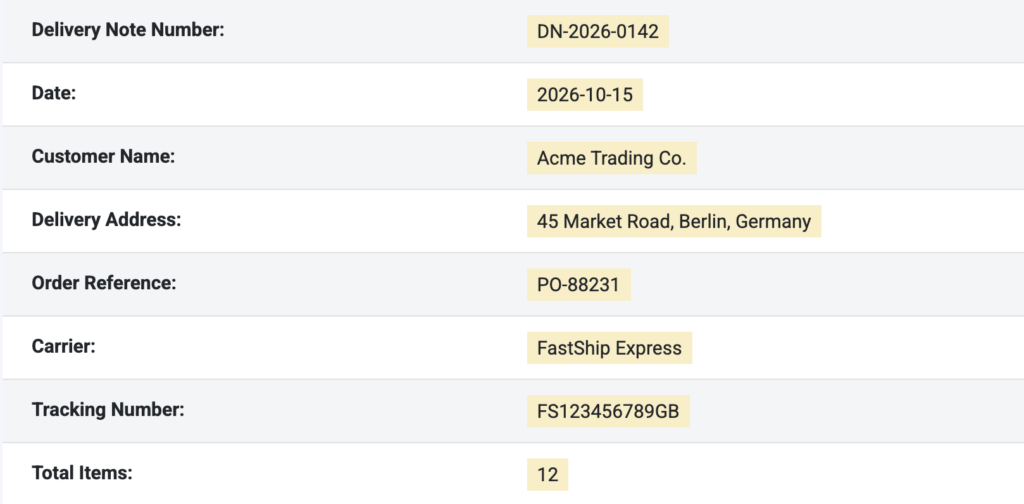
Here is an example of data extracted from a delivery note using Mailparser:
Logistics Delivery Note Parsed Data

3. Send data to your systems

Lastly, you export the extracted data to your business system. There, the next step in your workflow can be triggered automatically: notifying a team member, updating a record, etc. Mailparser supports integrations with thousands of cloud applications and can even connect with APIs.

By automating manual data entry, logistics teams will be able to:

  • Reduce hours of manual data entry down to minutes of automated data extraction.
  • Prevent data entry errors.
  • Enhance data accuracy.
  • Build an automated workflow that smoothly moves data from logistics documents into your systems.
  • Process higher volumes of email attachments without a proportional increase in workload.

If your team is spending hours every week keying in data from emails, using Mailparser will help them automate that process and easily get data into their systems.


Capture Data from Emails Effortlessly

Save countless hours of tedious data entry and streamline your workflows.

No credit card required.

What Makes Logistics Automation Difficult to Implement?

Despite its benefits, implementing logistics automation can be challenging. Companies must overcome financial, technical, and organizational hurdles to integrate new technologies into their operations.

  • Implementation costs: Automation can require a massive upfront cost, especially when it comes to investing in infrastructure upgrades, robotics, and specialized software. So it’s essential to plan this transition strategically and incrementally.
  • Lack of expertise: Teams may lack the technical knowledge needed to choose, implement, and maintain automation solutions.
  • Legacy systems: Old software systems may not be compatible with modern tools, requiring careful planning of what tools to modernize and how to build a connected ecosystem through integrations.
  • Resistance to change: Employees may be reluctant to adopt automation technologies and new workflows. To address this and facilitate adoption, companies should invest in training.
  • Difficulty knowing where to start: Because of this, companies put off automating their operations while competitors gain a competitive edge. Rather than automating everything at once, they should start with inefficient, data-heavy workflows, such as transferring data into systems. These smaller improvements can reduce repetitive work without requiring a major operational overhaul.

Understanding these challenges helps them plan the transition more effectively and identify the right starting point.

FAQs About Logistics Automation

What are examples of logistics automation?

Examples of logistics automation include automated storage retrieval, conveyor and sortation systems, guided vehicles, automatic tracking updates, automated order processing, document processing, and more.

How does AI apply to logistics operations?

AI helps logistics companies analyze operational data, forecast demand, optimize routes and inventory, identify potential delays, and make more informed decisions. It can also extract and classify information from emails and documents, making it easier to turn unstructured logistics data into information that can be used by other systems.

What does the future of logistics automation look like?

On the physical side of automation, robotics in logistics are expected to become more common and sophisticated. Also, more businesses will rely on self-driving vehicles and autonomous drones for transportation and delivery.

Experts also mention a higher adoption of integrated cloud platforms that centralize data, reduce paperwork, and enhance real-time visibility. We’ll also likely see more reliance on AI for areas like demand forecasting and predictive route optimization.

Can small logistics operations implement automation?

Yes. Small logistics operations can implement automation without changing the way they work or spending a lot upfront.

They can start with repetitive, inefficient processes that are relatively easy to automate, such as data entry, document processing, shipment tracking, or transferring information between systems. Starting with one workflow can demonstrate the value of automation before expanding to other processes.

How can logistics companies automate data entry?

Logistics companies can automate data entry by using a data extraction tool that captures data from documents or emails and sends it to a business application. This requires a one-off setup process for each type of document, during which the user defines the data fields to extract and how they should be structured. Once set up, the tool will automate data entry.

Start Automating Your Logistics Workflows With Email Parsing

Implementing logistics automation doesn’t have to be a daunting project. You can start by automating simple but inefficient processes that cost your team countless hours every week. Email parsing helps you extract key data from email and send it to your WMS, TMS, or any system.

If manual data entry is holding back productivity and causing issues, give Mailparser a try today. By capturing data trapped in shipping orders, delivery notes, and other similar documents, you can update records faster, without inaccuracies, and automate the next steps in your workflows like notifications, inventory updates, and more.

Capture Data from Emails Effortlessly

Save countless hours of tedious data entry and streamline your workflows.

No credit card required.

You Might Also Like

Automatically Extract Data From Emails

Capture data from incoming emails and send it to spreadsheets, Google Sheets, databases, APIs, integration services, and more.

No credit card required