To recap, follow these steps:
1. Create an inbox in Mailparser.
2. Send an email with a file attachment to your @mailparser.io inbox.
3. Click on ‘Add Parsing Rules to Extract Data from Email Attachment’.
4. The Automatic Setup Wizard creates a set of parsing rules — one rule for each data field you want to extract. You can edit those rules and create more as needed.
5. When creating a new parsing rule, set the data source to “Attachment”, as shown in this image:
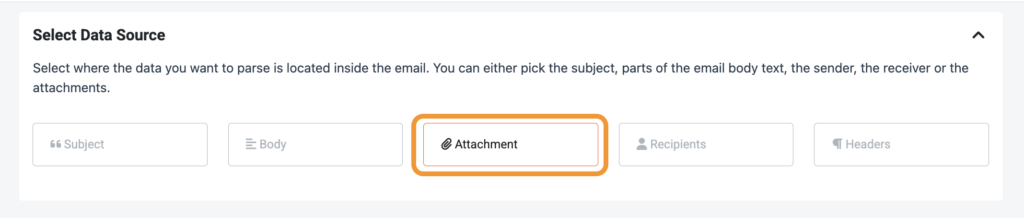
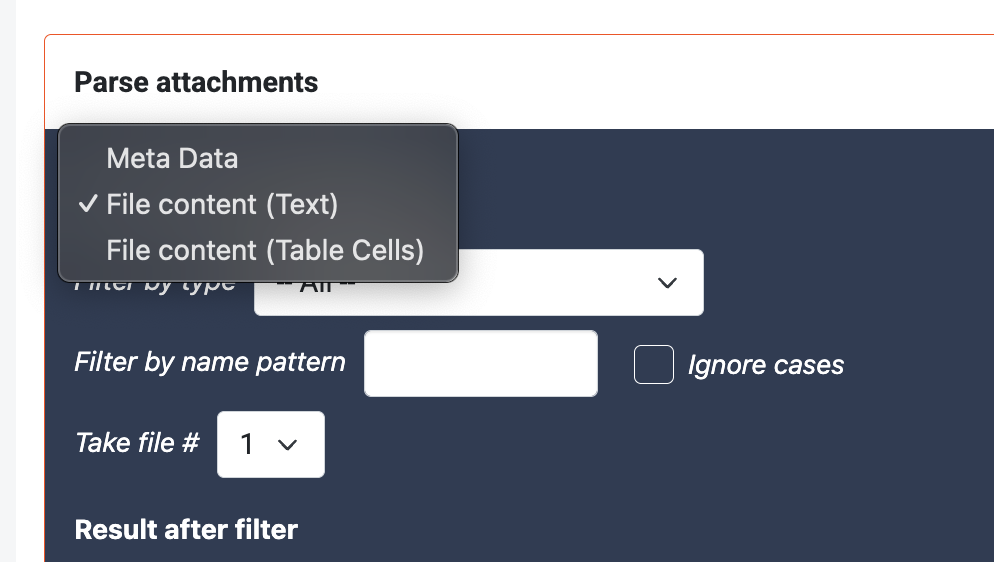
Then, choose “File Content (Text)” if you want to parse text. If you are parsing a spreadsheet file or you want to extract table rows from a PDF file, switch the filter to “File Content (Text Cells)”.
6. You will then see the text or table data from the attached file. From here on, you can add text or table filters to isolate the specific data point you want to extract.
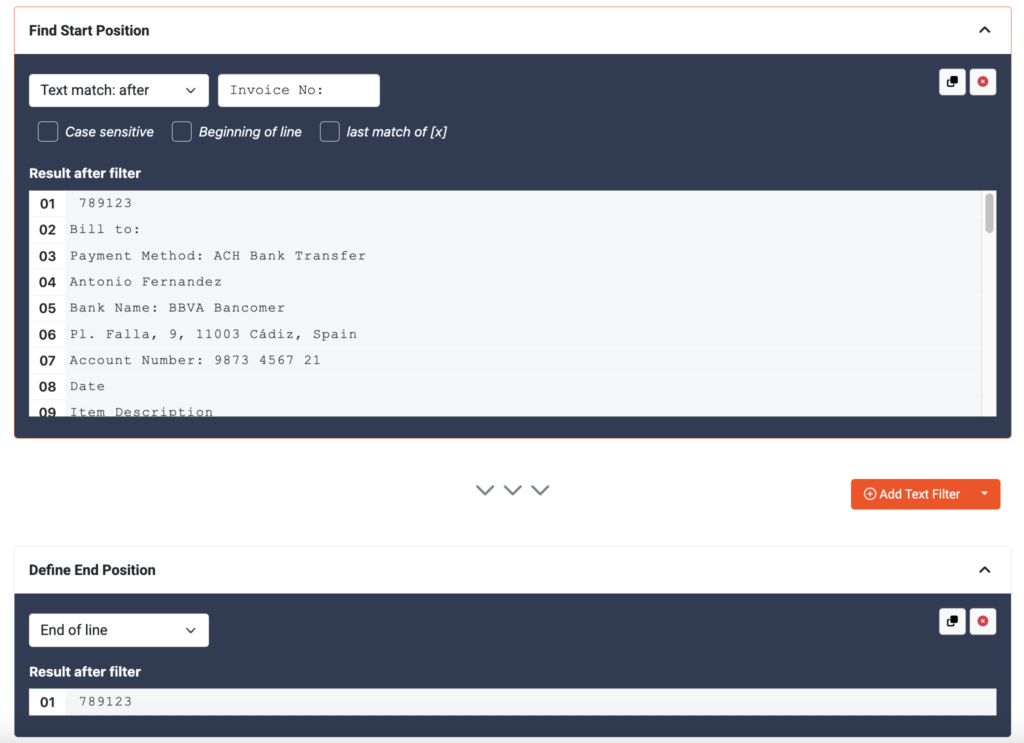
When needed, you can chain multiple text filters until your data field is isolated from the rest. With a first filter, we define where the data we want to extract is located inside the text of the attachment. Then, we define where the data field ends with another filter.
Setting up Mailparser to parse email attachments is easy with our no-code interface. You can edit your parsing rules at any time and also create multiple inboxes for different attachment parsing workflows. Our step-by-step tutorials showcase how Mailparser’s features work and how you can use it for different use cases. And if you need a hand getting your parser set up, our team is always available to help.
Which File Formats Are Supported?
Mailparser can parse email attachments in the following file formats:
- XLS / XLSX
- CSV
- DOC / DOCX
- TXT
- XML
- ZIP
If your file format is not listed yet, let us know, and we will look into it. The basic idea always stays the same. No matter the file format, Mailparser extracts the text (or table) and makes it available as if it were part of the email body.
What about images and scanned PDFs?
If you want to parse email attachments that are images or scanned PDFs, we recommend you use Docparser, the companion app to Mailparser. Docparser has an OCR engine and AI-powered features capable of identifying and extracting data from images and scanned PDFs with precision.
Where Can You Send Data Extracted from Email Attachments?
After parsing email attachments, you can download parsed data in four formats: XLS, CSV, XML, and JSON.
But that’s not all. You can also export data to other business tools:
- Google Sheets, Excel Online.
- Automation platforms (Zapier, Claris Connect, etc.).
- Direct integrations with cloud apps (Airtable, Microsoft Power Automate, Outlook, etc.).
- Third-party integrations with thousands of cloud apps (Notion, HubSpot, QuickBooks Online, etc.).
- APIs.
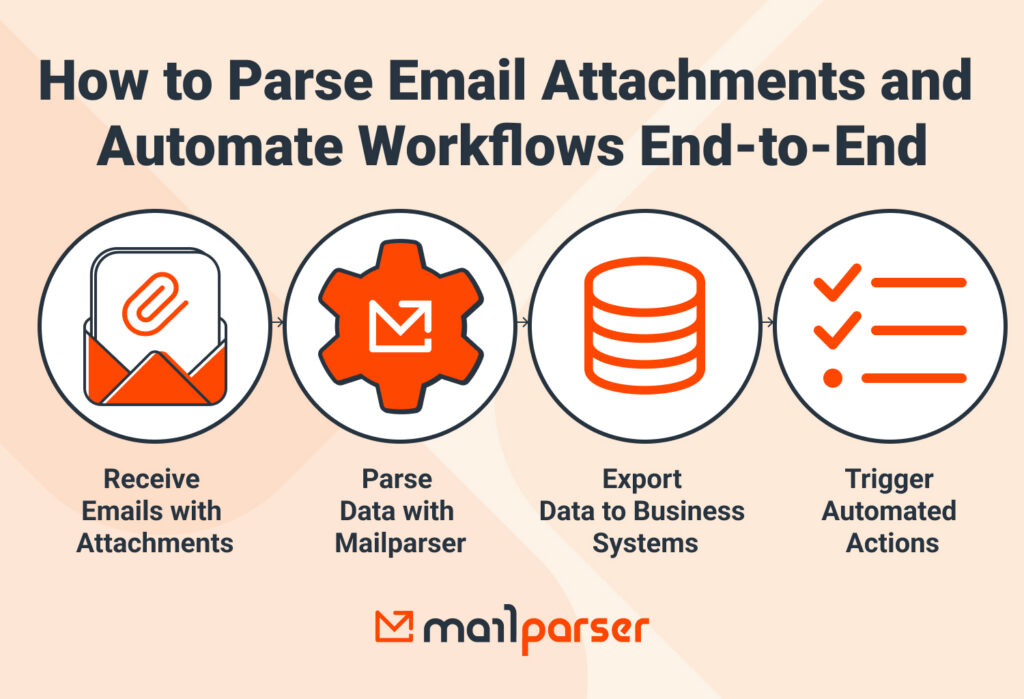
This is where the real benefits of automation are found. Beyond automating data entry, you can automate the simple but repetitive tasks that require data found in email attachments.
- Sending Slack notifications
- Creating new CRM records
- Sending follow-up emails
- Adding new client appointments
- Forwarding support tickets to a customer support platform
- And more
This automation leads to enhanced efficiency in your department, lower operational costs, and more time for high-value tasks that require human judgment. In fact, 43% of our users save more than 5 hours a week with email parsing.
What Can You Do With Email Attachment Parsing?
With email attachment parsing, you can automate workflows that depend on information stored in files received by email. Practical use cases include processing invoices, parsing reports, managing leads in CRMs, managing and updating HR records, adding shipping and logistics information, and more.
Automatically process invoices
One of our most common use cases is invoice parsing. Invoice data entry is a common problem for Accounts Payable teams. Email parsing automates this process and sends invoice data to accounting systems or ERPs where new invoice records are automatically created.
With the data entry bottleneck solved, the AP team can approve supplier invoices faster, avoid delays and mistakes, and negotiate better deals with vendors.
Parse recurring reports
Employees in many industries (finance, logistics, manufacturing, retail, e-commerce, etc.) often receive recurring reports by email that contain operational, financial, inventory, sales, or other business data. Those reports may be daily, weekly, biweekly, or monthly.
You can see the value of parsing attachments here. After consolidating data in one place, you can focus on the most important tasks in your workflow: sharing with team members, analyzing data, preparing slides, etc.

Professionals with coding skills write scripts to automate this workflow. But with Mailparser, anyone can achieve the same result.
Capture lead details into a CRM
Another major use case for email attachment parsing is extracting lead information from forms and other documents submitted by prospects or shared by colleagues. By speeding up the inbox-to-CRM process, sales reps can follow up with leads much faster.
This is particularly useful for real estate, financial services, insurance, education, home services, and other industries that generate leads through online forms and receive completed forms as email attachments.

Photo by Vitaly Gariev from Pexels
Automate HR document processing
HR teams regularly receive resumes, contracts, onboarding forms, timesheets, and other employee documents as email attachments. Those documents are often structured, making the task easy for email parsers.
In addition to saving time, automated data extraction helps improve clear audit trails and reduce compliance risks by keeping consistent, accurate records. It’s also a boon for recruitment workflows, as recruiters can centralize candidate information from resumes and then swiftly proceed with candidate shortlisting.
Process shipping and logistics documents
Many businesses in the logistics industry parse email attachments to capture key information such as tracking numbers, order numbers, shipment details, delivery information, and delay alerts. That data gets routed to the systems or teams that need it, helping automate subsequent tasks like:
- Updating shipment records.
- Notifying customers.
- Triggering fulfillment processes.
- Keeping teams informed of delivery status.
By automating those routine tasks, teams reduce mistakes, rework, and disputes. On top of that, they can focus more on customer service and strategic work such as improving inventory planning, forecasting demand, or developing process improvements.